
Participating Frequently
Mar 2, 2017 10:46 AM UTC
Question

Windows 10 security or Reader playing up?

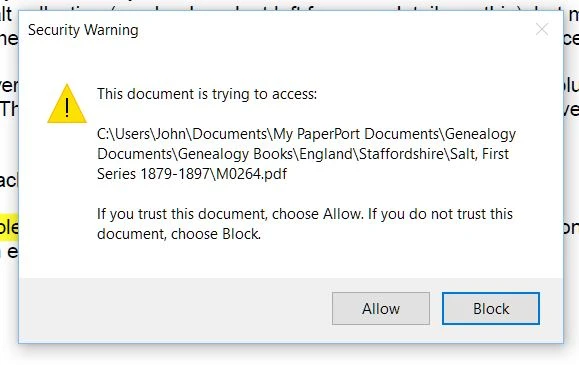
Upon opening an old collection of indexed pdf files the links now require me to "Allow" them to open. This works fine ONCE. If I want to subsequently open the link nothing happens. Reader seems to ignore me.  This is the first time that I have tried to read these files under Windows 10 so I suspect that it's a MS problem rather than an Adobe one.  Any suggestions that don't include reverting to Windows XP are welcome, but please keep it simple because I am ancient and dim.
    This topic is closed to new replies. Start a new post to keep the conversation going.

    3 replies

    try67
    Community Expert
    Community Expert
    Mar 2, 2017 12:44 PM UTC

    Are you sure these files exist on your system, exactly in this location?

    I don't think it has anything to do with the OS, and going back to Windows XP is a serious overkill just to solve this problem...

    Translate
    Participating Frequently
    Mar 2, 2017 10:12 PM UTC

    I've tried closing the Windows security settings but all it does is to upset Windows and doesn't eliminate the problem.  The files are in the right place because Reader will initially open the links the first time when I click on allow, the problem occurs when I want to re-open a closed file and the link won't let me. Sometimes on the second and subsequent attempts the security warning will flash up for under a second and sometimes it won't. I don't know which programme is generating this warning otherwise I might be able to do something about it.

    Do you have a link to an earlier version of Reader, say a couple of years ago, so that I can see if it is Reader or the OS.

    Translate
    try67
    Community Expert
    Community Expert
    Mar 2, 2017 10:16 PM UTC

    You can get Reader XI from here: Adobe Acrobat Reader DC Install for all versions

    Earlier versions than that are available here: ftp://ftp.adobe.com/pub/adobe/reader/win/

    Translate