
Participant
October 13, 2025
Answered

Windows - Application Error beim Öffnen von PDFs

  • October 13, 2025
  • 2 replies
  • 187 views

Hallo! 

Wir haben bei vielen Kollegen das gleiche Problem seit ca. 2 Wochen. 

Sobald eine PDF geöffnet wird und Adobe Acrobat Reader startet erscheint folgende Fehlermeldung:
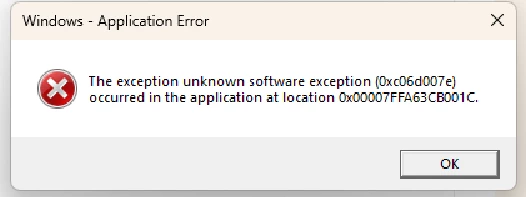
Diese Fehlermeldung erscheint gesamt 4 mal. Nachdem man 4 mal auf "OK" geklickt hat, ist sie weg und das PDF kann ganz normal angeschaut werden. 


Folgendes haben wir bereits ausprobiert zur Fehlerbehebung:

Aktuellste Version von Adobe Reader installiert -> ohne Erfolg

Microsoft Visual C++ geupdatet -> ohne Erfolg
komplett deinstalliert und neu installiert -> ohne Erfolg
Windows Updates überprüft -> keine verfügbar
Adobe Ordner im Registry Editor gelöscht -> ohne Erfolg
versucht als Admin ein PDF zu öffnen -> auch dann erscheint die Fehlermeldung
sfc /scannow ausgeführt -> ohne Erfolg


Woran kann dieses Problem noch liegen? Wer hat einen weiteren Lösungsvorschlag? 


Vielen Dank im Voraus!


Correct answer creative explorer

@Admin-sw it sounds like it's a local compatibility or configuration conflict. With the error appearing consistently when opening PDFs and disappears after clicking “OK” several times it suggests a recurring memory or runtime issue within the application itself, possibly tied to how Acrobat Reader interacts with Windows 11 or specific system libraries. A couple work-arounds, disable Protected Mode at startup in Acrobat Reader (under Preferences > Security (Enhanced)). This can sometimes resolve memory-related errors, especially if they’re triggered by sandboxing conflicts. Second work-around, to switch to the 32-bit version of Acrobat Reader if you’re currently using 64-bit, as some users have reported better stability.

2 replies

JR Boulay
Community Expert
Community Expert
October 15, 2025

[MOVED TO THE ACROBAT READER DISCUSSIONS]

Acrobate du PDF, InDesigner et Photoshopographe
creative explorer
Community Expert
creative explorerCommunity ExpertCorrect answer
Community Expert
October 15, 2025

@Admin-sw it sounds like it's a local compatibility or configuration conflict. With the error appearing consistently when opening PDFs and disappears after clicking “OK” several times it suggests a recurring memory or runtime issue within the application itself, possibly tied to how Acrobat Reader interacts with Windows 11 or specific system libraries. A couple work-arounds, disable Protected Mode at startup in Acrobat Reader (under Preferences > Security (Enhanced)). This can sometimes resolve memory-related errors, especially if they’re triggered by sandboxing conflicts. Second work-around, to switch to the 32-bit version of Acrobat Reader if you’re currently using 64-bit, as some users have reported better stability.

m
Admin-swAuthor
Participant
October 16, 2025

@creative explorerThanks a lot for your help! Disabling Protected Mode didn’t solve the issue, but after switching to the 32-bit version everything is running smoothly without the error.