
saik34019876
Participant
July 30, 2018
Answered

"Windows cannot find" error

  • July 30, 2018
  • 2 replies
  • 3811 views

I recently cleaned my laptop Win 10 OS thru tune-up and also thru windows disk clean up and defragmented my C drive and registry. Everything was fine but now I'm unable to open PDF thru adobe reader although PDFs are being opened with other readers Eg. Edge, Nitro.

It keeps displaying this error (screenshot attached) and doesn't make any sense.
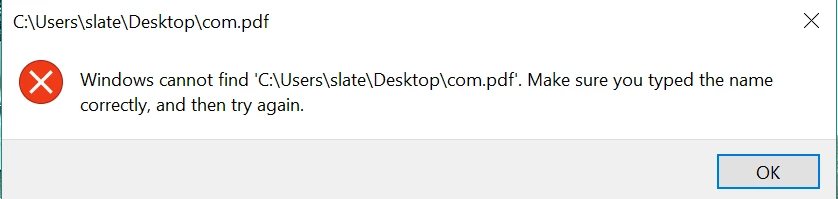
How can I resolve it? I uninstalled deleted Adobe folders from Local, Roaming, and program files restarted and reinstalled even tried checking in compatibility Win 8 and run as administrator. Still no luck.

This topic has been closed for replies.
Correct answer AnandSri

Hello Saik,

We're sorry for the delayed response and inconvenience caused. The main desktop application has to be installed on the main drive i.e. C drive. If you change the install location, it will still put several GB on C to support the install.

Are you not able to open one specific PDF file or all the PDF file? Make sure that you have the latest version of Adobe Reader installed 2018.011.20063. You can install the update from DC Release Notes — Release Notes for Acrobat DC Products

For testing purpose, navigate to Edit>Preferfences>Security(Enhanced)>deselect 'Enable Protected Mode at startup' and 'Enable Enhanced Security'>Click OK and then try to open the PDF.

Disabling the Protected mode and Enhanced security is only for testing purpose, please enable it back.

Let us know how it goes and share your findings.

Regards,

Anand Sri.

2 replies

Participant
July 1, 2022

I have the same issue with pdf files,


You can solve it by right click on the pdf file - open with - Choose another app:

From the list choose Adobe reader as below :

AnandSri
Community Manager
Community Manager
August 3, 2018

Hello Saik,

We're sorry for the delayed response and inconvenience caused. Please reboot the machine once and go to Window -> Cascade -> Tile and see if this brings any PDF files.

You can also refer and try the suggestions from https://helpx.adobe.com/in/acrobat/kb/cant-open-pdf.html

If you are not able to open PDF files, then use Acrobat cleaner tool to remove Adobe Reader Download Adobe Reader and Acrobat Cleaner Tool - Adobe Labs

Reboot the machine again, and try installing Adobe Reader from Adobe - Adobe Acrobat Reader DC Distribution

Make sure that all the mandatory updates of the operating system installed.

If the issue still persists, please create a test user profile with full admin rights and try installing Adobe Reader.

let us know how it goes and share your observation.

Thanks.

Anand Sri.

saik34019876
Participant
August 7, 2018

I cleaned it with Acrobat cleaner tool (removed reader) and restarted then installed Adobe this time I have changed the location to E:/ instead of C:/ still same error.

I did creat another profile and there it displayed adobe is already installed and when I open PDF files it displays the same error.

AnandSri
Community Manager
AnandSriCommunity ManagerCorrect answer
Community Manager
September 19, 2018

Hello Saik,

We're sorry for the delayed response and inconvenience caused. The main desktop application has to be installed on the main drive i.e. C drive. If you change the install location, it will still put several GB on C to support the install.

Are you not able to open one specific PDF file or all the PDF file? Make sure that you have the latest version of Adobe Reader installed 2018.011.20063. You can install the update from DC Release Notes — Release Notes for Acrobat DC Products

For testing purpose, navigate to Edit>Preferfences>Security(Enhanced)>deselect 'Enable Protected Mode at startup' and 'Enable Enhanced Security'>Click OK and then try to open the PDF.

Disabling the Protected mode and Enhanced security is only for testing purpose, please enable it back.

Let us know how it goes and share your findings.

Regards,

Anand Sri.