rachaela62269896
Participant
December 31, 2018
Answered

Word to PDF comments

  • December 31, 2018
  • 1 reply
  • 8937 views

I made a file in Microsoft Word, with comments, and exported it to PDF. The PDF displays the comments, but I was wondering if there is a way to display them more like Word itself (where once the mouse scrolls over the comment it displays, rather than all displaying at once). This is a feature I would like to build into a published document. Please inform if there is a way to accomplish this. Thanks-

    This topic has been closed for replies.
    Correct answer AkanchhaS8194121

    Hey Rachaela, 

    Since Acrobat and MS Word are two different application which have their own mechanism of working with documents. So the commenting behavior of MS Word and Adobe Acrobat is also different. As you have suggestion for modification, so you can fill the feature request form here: Feature Request/Bug Report Form  

    I made a file in Microsoft Word, with comments, and exported it to PDF. The PDF displays the comments, but I was wondering if there is a way to display them more like Word itself (where once the mouse scrolls over the comment it displays, rather than all displaying at once).

    When pdf with comment, opened in Adobe Reader/Acrobat displays the comment notes only when you hover over it. The comment list appears when document is opened using by selecting "Comment Tool"

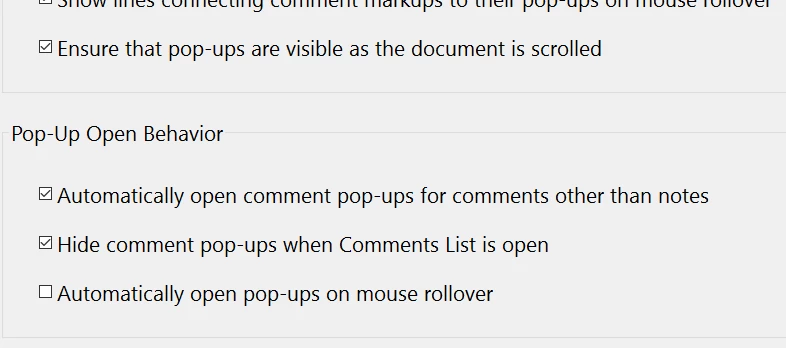
    You can change the comment pop-up behavior navigating the commenting preferences of Acrobat.

    Open Acrobat>Edit>Preferences>Commenting.
    Hope this helps!

    Regards,

    Akanchha

    1 reply

    AkanchhaS8194121
    AkanchhaS8194121Correct answer
    Legend
    February 19, 2019

    Hey Rachaela, 

    Since Acrobat and MS Word are two different application which have their own mechanism of working with documents. So the commenting behavior of MS Word and Adobe Acrobat is also different. As you have suggestion for modification, so you can fill the feature request form here: Feature Request/Bug Report Form  

    I made a file in Microsoft Word, with comments, and exported it to PDF. The PDF displays the comments, but I was wondering if there is a way to display them more like Word itself (where once the mouse scrolls over the comment it displays, rather than all displaying at once).

    When pdf with comment, opened in Adobe Reader/Acrobat displays the comment notes only when you hover over it. The comment list appears when document is opened using by selecting "Comment Tool"

    You can change the comment pop-up behavior navigating the commenting preferences of Acrobat.

    Open Acrobat>Edit>Preferences>Commenting.

    Hope this helps!

    Regards,

    Akanchha