Known Participant
Nov 22, 2026 4:53 PM UTC
Answered

Would like Acrobat to remember print scale so I don't need to input every time

I print a ton of USPS labels that always need to be 90% so they’re not cut off on my label printer. 

It would be nice to remember the setting for me. Like a SAVE AS DEFAULT button. 
 

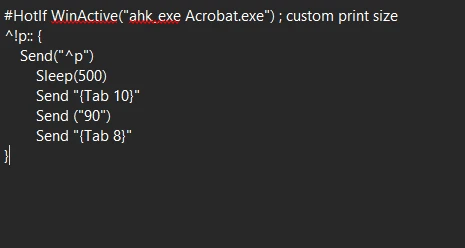
My workaround for now is using Autohotkey to make “Control Alt P” tab to that input and put in 90% for me. 

Here is the script if someone needs it. It tabs to the Print button after the input. This website seems to block posting the actual text. 


    Anand Sri Bhattacharya
    Community Manager
    Nov 24, 2026 5:21 PM UTC

    Hello ​@Visualplastik 


    Thanks for confirming, and for testing this in both Acrobat Reader and Acrobat Pro.

    You’re right that Fit, Actual size, and Shrink don’t address this use case. For USPS labels, you specifically need the custom scale to remain at 90%. Adobe’s current print options allow you to enter a custom scale percentage, but I’m not finding a supported preference to save that custom percentage as the default for future print jobs. Reference help article: https://helpx.adobe.com/lv/acrobat/desktop/print-documents/set-up-and-print-pdfs/page-size.html


    So your suggestion for a“Save as default” option for Custom Scale makes sense as a feature request. Your AutoHotkey workaround is useful in the meantime, but having Acrobat remember the value would clearly be more convenient.

    Thanks for explaining the use case so clearly. Please use the Acrobat Wish form to file a feature request directly with the product team on this: https://acrobat.uservoice.com/


    Regards,

    Anand Sri.

    4 replies

    Anand Sri Bhattacharya
    Community Manager
    Community Manager
    Nov 23, 2026 12:31 PM UTC

    Hello ​@Visualplastik 


    I hope you are doing well, and thanks for sharing your workaround and mockup. Sorry for any trouble.


    Having to enter 90% repeatedly adds an extra step when printing labels in volume. 

    Adobe’s Adjust page size for printing article confirms that Custom Scale resizes a page by the percentage you specify. However, it does not describe a way to save that percentage as a default for all future PDFs.

    Adobe also documents Print Dialog Presets under Document Properties > Advanced. These are document-level settings; the article does not document an application-wide custom-percentage default matching your proposed button.


    Could you share your Reader version from Help > About Adobe Acrobat Reader, and whether 90% resets when printing the same PDF again, opening a different PDF, or restarting Reader? That would help distinguish a settings-retention issue from your request for a default across documents.

    For the clipping, Shrink oversized pages is a documented option that reduces pages to fit the selected paper size without enlarging smaller pages. It may be worth testing with the correct label-paper size selected, but it does not guarantee exactly 90% or address your request to remember that value.


    I hope this helps, and please reach out if you need any assistance.


    Regards,

    Anand Sri.

    Translate
    Known Participant
    Nov 24, 2026 4:59 PM UTC

    I’ve used both the current “Reader” and “Pro” versions, installed this week. They behave the same. 

    None of the other suggestions make a difference, fit, actual size, and shrink are all identical to Scaling 100%. It does not save the percentage setting (90% in this case), even when reopening the print modal from the same open document, let alone reopening the document or another document. My suggestion for a save button is the most obvious, easiest solution. 

    Translate
    Anand Sri Bhattacharya
    Community Manager
    Community Manager
    Nov 24, 2026 5:21 PM UTC

    Hello ​@Visualplastik 


    Thanks for confirming, and for testing this in both Acrobat Reader and Acrobat Pro.

    You’re right that Fit, Actual size, and Shrink don’t address this use case. For USPS labels, you specifically need the custom scale to remain at 90%. Adobe’s current print options allow you to enter a custom scale percentage, but I’m not finding a supported preference to save that custom percentage as the default for future print jobs. Reference help article: https://helpx.adobe.com/lv/acrobat/desktop/print-documents/set-up-and-print-pdfs/page-size.html


    So your suggestion for a“Save as default” option for Custom Scale makes sense as a feature request. Your AutoHotkey workaround is useful in the meantime, but having Acrobat remember the value would clearly be more convenient.

    Thanks for explaining the use case so clearly. Please use the Acrobat Wish form to file a feature request directly with the product team on this: https://acrobat.uservoice.com/


    Regards,

    Anand Sri.

    Translate
    Known Participant
    Nov 22, 2026 5:25 PM UTC
    Mockup with default button 


    Translate