Answered
Wrong icon in taskbar in Windows10
Whenever I am opening Adobe Acrobat Reader DC in Windows 10, the icon in taskbar is not of Adobe. I have tried uninstalling and installing the Adobe Acrobat Reader DC.
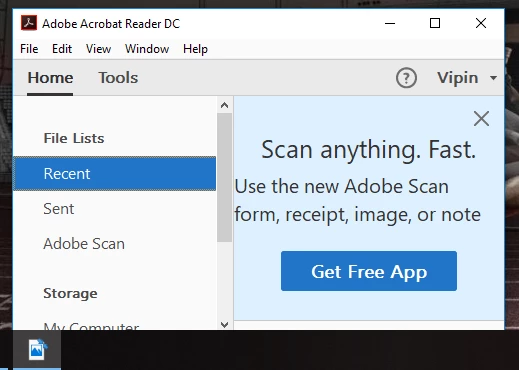

Whenever I am opening Adobe Acrobat Reader DC in Windows 10, the icon in taskbar is not of Adobe. I have tried uninstalling and installing the Adobe Acrobat Reader DC.
Hi vipinkumar,
As mentioned above you are facing issue with reader icon on the machine, try the solution given in the following forum thread under correct answer and check if that resolves the issue: Adobe Reader icon not showing on Windows 10
You may also refer to the following forum thread discussing the similar issue:
Acrobat Icon Wrong in Windows 10 Start Menu
Let us know if you need any help.
Shivam
Already have an account? Login
Enter your E-mail address. We'll send you an e-mail with instructions to reset your password.
 AdChoices