
Participating Frequently
Oct 10, 2025 6:23 AM UTC
Question

Wrong symbols and texts when opening a pdf file with Adobe Acrobat Reader

Good morning,


i am trying to pen a pdf (an invoice) using Adobe Acrobat Reader and i get the following:
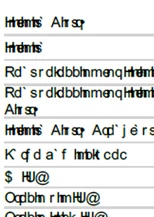
opening the file in a different computer usign Adobe Acrobat Reader i can open it correctly.


Even when the file probably doesn´t have the correct fonts attached, does anybody know what needs to be done in the first computer/program to open the file correctly as font is Arial.


Thanks in advance. Best regards.

2 replies

justlearn
Community Expert
Community Expert
Oct 15, 2025 7:37 AM UTC

@Sergio243401196rw6 Chances are, whomever created the PDF in the first place, they likely made the PDF, without embedding the fonts used—like Arial in your case—it relies on the viewer’s system to supply those fonts. If the computer opening the file doesn’t have the exact version of the font installed or if Acrobat isn’t accessing it properly, the text can appear distorted, with wrong symbols or unreadable characters. That’s why the same PDF might look fine on one computer but not on another.

Try opening the PDF in another viewer (like Microsoft Edge, Firefox or Chrome) to confirm if the issue is Acrobat-specific.

Translate
m
Niklas Larsson
Participant
May 13, 2026 11:11 AM UTC

Same issue here from time to time (same font, not embedded) for a specific user. Uninstalling, restarting and reinstalling Acrobat Reader always works. However, the issue always returns after a few months.

I find it hard to believe the user does not have Arial font installed but will check.

Translate