Answered
зачок / иконка отображается неправильно
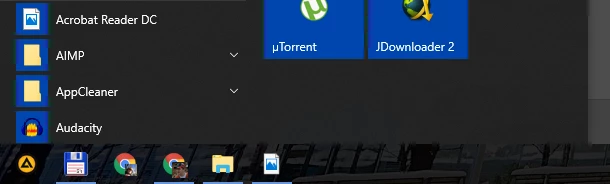
сразу после установки значки Acrobat Reader DC выглядят так
Windows 10 x64 лицензия
переустанавливал несколько раз - не помогло
кэш значков удалял - не помогло

сразу после установки значки Acrobat Reader DC выглядят так
Windows 10 x64 лицензия
переустанавливал несколько раз - не помогло
кэш значков удалял - не помогло
Hi,
Sorry for the delay in response to your query.
If you are still experiencing the same problem, and have not been able to remove the application using cleaner tool and neither through control panel. Then you must create the Hidden admin account and check the same in that.
Because there is seems to be a problem with the user account itself, as its neither installed the application correctly nor letting to remove it properly.
How to enable the hidden admin, you may check-
1- First you’ll need to open a command prompt in administrator mode by right-clicking and choosing “Run as administrator” (or use the Ctrl+Shift+Enter shortcut from the search box).
Note that this works the same in all versions of Windows. Just search for cmd and then right-click on the command prompt icon in the Start menu or Start screen.
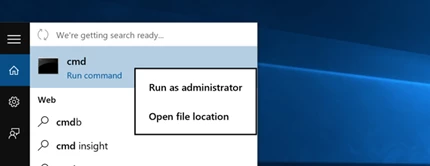
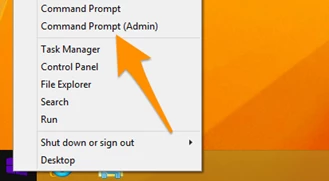
If you are in Windows 8.x or 10 you can right-click on the Start button and choose to open a command prompt that way.
2- Now type the following command:-
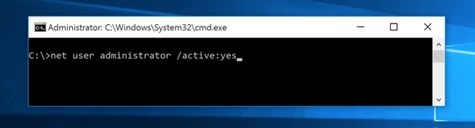
3- You should see a message that the command completed successfully. Log out, and you’ll now see the Administrator account as a choice. (Note that this screenshot is from Vista, but this works on Windows 7 and Windows 8 and Windows 10)
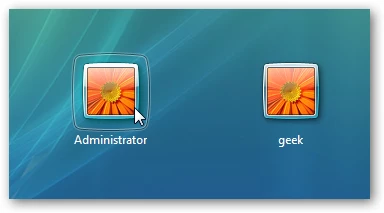
You’ll note that there’s no password for this account, so if you want to leave it enabled you should change the password.
Disable Built-in Administrator Account
Make sure you are logged on as your regular user account, and then open an administrator mode command prompt as above. Type the following command:
net user administrator /active:no
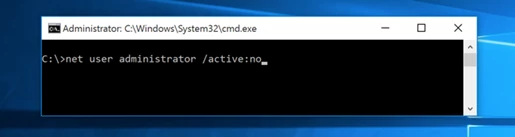
Regards,
Akanchha
извините за долгое отсутствие
ничего не помогло(
видимо проблема в системе
видимо буду переустанавливать систему в ближайшем будущем)
спасибо за помощь
Already have an account? Login
Enter your E-mail address. We'll send you an e-mail with instructions to reset your password.
 AdChoices