Participant
February 13, 2026
Question

어도비 리더에서 PDF 파일 열때 오류가 발생되고 종료 됩니다.

  • February 13, 2026
  • 2 replies
  • 41 views

어도비 리더에서 PDF 파일 열기 진행 시 이미지와 같이 오류가 나오고 강제 종료됩니다.
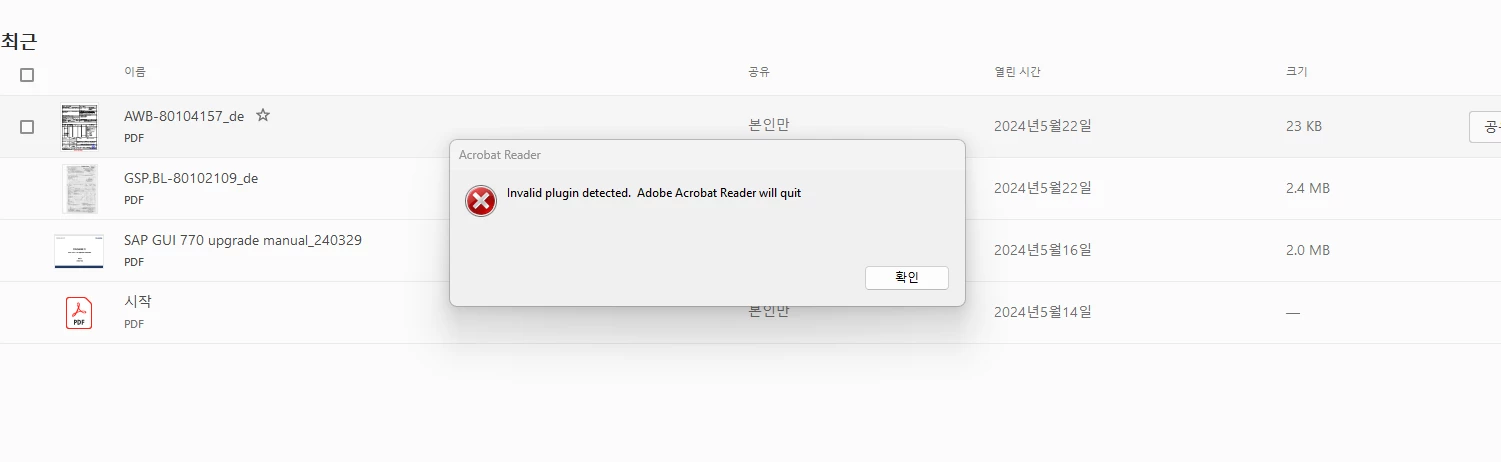
위 에러창이 나오고 확인버튼을 누르면 바로 종료됩니다.

해결 방법 가이드 주시면 감사하겠습니다.

    2 replies

    AnandSri
    Community Manager
    Community Manager
    February 19, 2026

    Hello ​@j.h._3316 


    I hope you are doing well, and thank you for reaching out. We’re sorry for the trouble you had.


    Please close the application, restart the machine once, and check for any pending updates by navigating to Menu > Help> Check for Updates. Install the updates, restart the app and the machine, and try again. Version:  25.001.21223 Planned update. Feb 17, 2026


    Let us know how it goes.

    Regards,

    Anand Sri.

    j.h._3316Author
    Participant
    February 23, 2026

    업데이트 후에도 동일증상을 보이고 있습니다.

    사용자분들 대부분 사용중인 OS는 윈도우 11  25H2 최신 버전을 사용중입니다.

    AnandSri
    Community Manager
    Community Manager
    February 23, 2026

    Hello ​@j.h._3316 


    Thank you for sharing the details. If the issue still occurs with the latest build, could you please collect the logs from the affected machine, and share them with us for further investigation?


    To collect the logs, please refer to the article provided. When you run the log collector tool, make sure to select all the options. Try to replicate the issue while doing this. Once you have collected the logs, please share them along with the log ID: https://helpx.adobe.com/acrobat/kb/collect-logs-crash-freeze.html


    Regards,

    Anand Sri.

    creative explorer
    Community Expert
    Community Expert
    February 13, 2026

    @j.h._3316 are you using any plugins? If you open Creative Cloud Desktop App - In the left side, select Apps - go to Acrobat - Click on the three dots … and select Manage Plugins. If there is anything there maybe un-install it. Then restart Acrobat. 


    m
    j.h._3316Author
    Participant
    February 19, 2026

    Creative Cloud앱으로 사용중이 아닌 설치형 리더 프로그램 사용중인 상태입니다.

    해당 프로그램에 맞게 가이드 부탁드립니다.

    감사합니다.

    creative explorer
    Community Expert
    Community Expert
    February 23, 2026

    @j.h._3316 as above… the error message is about plugins...

    m