
Known Participant
September 15, 2022
Question

On adding a third party plug-in, Adobe Acrobat DC not opening

  • September 15, 2022
  • 3 replies
  • 933 views

We have a plug-in application, which was implemented for 32 bit Acrobat was fine on the same.

Recently we got a requirement for 64 bit version of acrobat, so I followed the steps mentioned in 64 bit SDK and upgraded the same application for 64 bit acrobat.  I was able to compile the code and successfully created the plug-in, which I added to plug-ins folder of acrobat (say....  Adobe\Acrobat DC\Acrobat\plug_ins).  But when I try to open the acrobat, it is not opening the acrobat. (and when that plug-in removed from the folder, acrobat opening).

When I try to debug the code,  below things are shown.
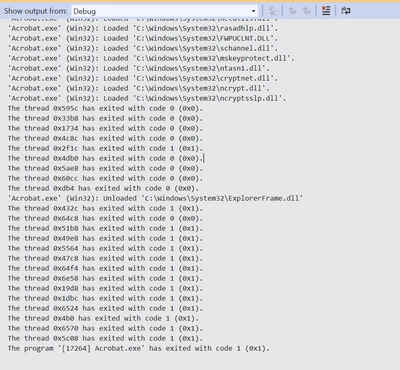


What causing the acrobat failing to open in my Plug-in application.

Please help me to sort out this issue.


This topic has been closed for replies.

3 replies

Legend
September 21, 2022

I took the time to reply to your other post. Please take the time to tell us what happened when you tried my suggestions. On adding a third party plug-in, Adobe Acrobat DC ... - Adobe Support Community - 13201206

Known Participant
September 21, 2022

Sorry it really helped me (Adding a MessgeBox at different functions), to figure out the problem,

It is actually a dll in our code, that was preventing our plug-in application,  when I bypass that dll code, plug-in loaded into acrobat and acrobt menu showing my plug-in app.  

thank you for your suggestion.

Legend
September 21, 2022

Thank you for sharing that solution. I hope it will hope in future when people face a similar problem.

Bernd Alheit
Community Expert
Community Expert
September 21, 2022

Duplicate posting

BarlaeDC
Community Expert
Community Expert
September 21, 2022

Hi,


Maybe it would help if you could provide some idea as to what your plug-in /code does, based on the above it is doing something that is not liked and therefore erroring, but this is very hard to work out without actually seeing what you are running.


Can you cut down your plug-in, and if it loads, then gradually add more of it back in, until it fails?