

Participant
May 25, 2016
Answered

On forms we send out and receive back, the data in the form fields will not print. We can view the data, but the fields print blank. How do I fix this?
  • May 25, 2016
  • 1 reply
  • 1049 views

On forms we send out and receive back, the data in the form fields will not print.  We can view the data, but the fields print blank.  How do I fix this?

This topic has been closed for replies.
Correct answer Karl Heinz Kremer

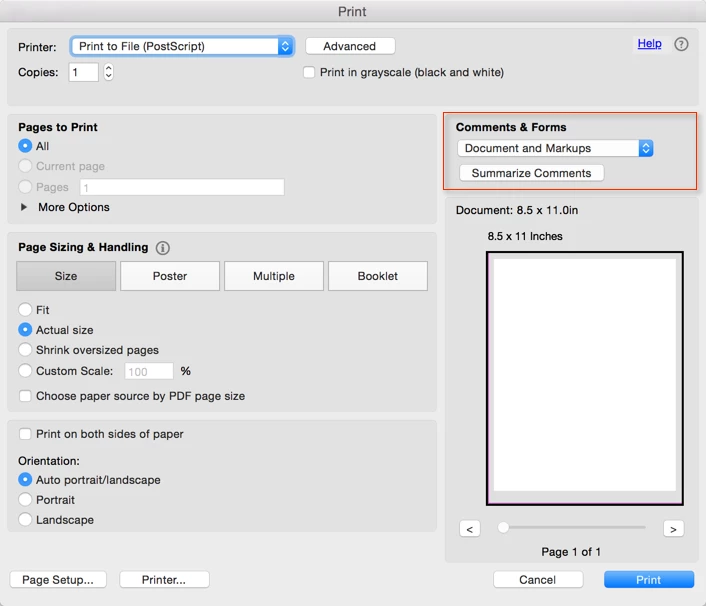
OK, that's different. These text boxes are (at least from a technical point of view) not considered form data, they are annotations (or markup). On your print dialog, you will see a "Comments & Form" group. Make sure that the first control is set to "Document and Markups":

After this change, you should see the markup on your prints.

1 reply

Karl Heinz  Kremer
Community Expert
Community Expert
May 25, 2016

Is this a form you created? If so, chances are that the fields are set to "visible, but does not print. You can fix that by going into the field properties for one field, then go to the "General" tab and look for the "Form Field" property:

This must be set to "Visible" to both show up on the screen and also print.

If this is not the problem, we need a bit more information about the form.

Amy34Author
Participant
May 25, 2016

Karl, thanks for the reply.  I apologize for not being more clear.  Most of the time, we are having this problem with people who insert their own text boxes (I assume they are text boxes) onto the form.  The information in those boxes does not print.

Karl Heinz  Kremer
Community Expert
Karl Heinz KremerCommunity ExpertCorrect answer
Community Expert
May 25, 2016

OK, that's different. These text boxes are (at least from a technical point of view) not considered form data, they are annotations (or markup). On your print dialog, you will see a "Comments & Form" group. Make sure that the first control is set to "Document and Markups":

After this change, you should see the markup on your prints.