
Adobe Embed API Wordpress WPRocket
Hello,
I am facing an issue which I have been trying to resolve but it is not straightforward for me so I would appreciate anyone guidance. I chose to remove the PDF Embed plugin and I am now using the adobe PDF Embed API:
<div id="adobe-dc-view" style="height: 600px; width: full;"></div>
<script src="https://documentservices.adobe.com/view-sdk/viewer.js"></script>
<script type="text/javascript">
document.addEventListener("adobe_dc_view_sdk.ready", function(){
var adobeDCView = new AdobeDC.View({clientId: "555555555555", divId: "adobe-dc-view"});
adobeDCView.previewFile({
content:{location: {url: "https://www.myaddress.com/wp-content/uploads/5.pdf"}},
metaData:{fileName: "product-manual.pdf"}
}, {embedMode: "FULL_WINDOW", showFullScreen: true});
});
</script>
The primary issue is that the pdf is not always loading on my website. Sometimes it does and sometimes it does not and this is random. WPRocket is activated and so is: JSMinify, JS Deferred and Delay JS. I have confirmed that this issue exists only when delay JS is activated. When deactivated there is no issue.
Since Delay JS gives a significant performance boost on my website, I would like to leave this setting ON. So I have been trying to using exclusion rules in the Delay JS section. No matter what I have tried it consistently fails. The strange thing is that it continues to fail even when I use something like this:
(?:wp-content|wp-includes)(.*)
/jquery-?[0-9.](.*)(.min|.slim|.slim.min)?.js
js-(before|after)
which practically excludes everything and although the Delay JS is ON, we shouldn't be seeing any performance benefits. So the only option for me is to completely deactivate the Delay JS in WPRocket.
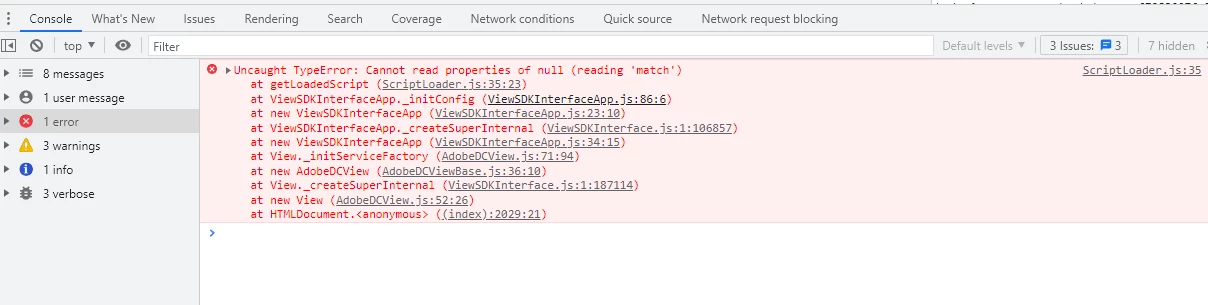
Not sure what to try.
Thank you
Konstantinos


 AdChoices