
Answered
Bad Gateway (Get PDF Properties)
Hello,
I am attempting to retrieve a PDF file from an FTP and the read the properties of the file using "Get PDF Properties", but continue to receive an error about a "BadGateway". Is there a problem with the endpoint? I am able to use other Adobe Premium features (like OCR, split, and merge), so I believe my credentials are all properly inserted.
Here's the raw output:
{
    "statusCode": 502,
    "headers": {
        "Transfer-Encoding": "chunked",
        "x-request-id": "ACQqBfcfst8nJe7ASbTcb6SY2pHiqXns",
        "pragma": "no-cache",
        "x-content-type-options": "nosniff",
        "strict-transport-security": "max-age=31536000; includeSubdomains",
        "x-robots-tag": "noindex,nofollow",
        "vary": "accept-encoding",
        "Timing-Allow-Origin": "*",
        "x-ms-apihub-cached-response": "true",
        "x-ms-apihub-obo": "true",
        "Cache-Control": "no-store, must-revalidate, no-cache",
        "Date": "Fri, 24 Jun 2022 16:57:12 GMT",
        "Content-Type": "application/json",
        "Expires": "Thu, 01 Dec 1994 16:00:00 GMT",
        "Content-Length": "348"
    },
    "body": {
        "error": {
            "code": 502,
            "source": "flow-apim-msmanaged-na-eastus-01.azure-apim.net",
            "clientRequestId": "58ef556a-794b-4a29-8f9f-1a99f7acc035",
            "message": "BadGateway",
            "innerError": {
                "error": {
                    "code": "OperationException",
                    "message": "HTTP 500 Internal Server Error"
                }
            }
        }
    }
}
Here's the setup of the flow:
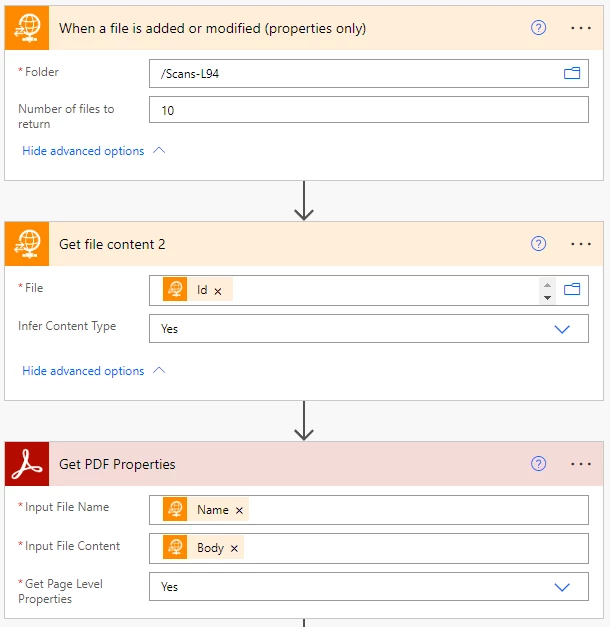
Thank you,
David


 AdChoices