Participant
January 26, 2022
Question

BadGateway on Convert Word To PDF in Power Automate

  • January 26, 2022
  • 1 reply
  • 2164 views

Hi there,

I am hoping someone has the answer for this.

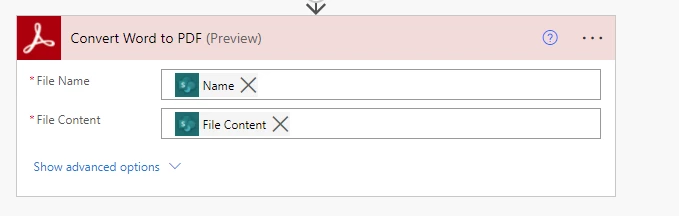
My flow stopped working about 2 weeks ago. After troubleshooting in anyway I can think of, I still can't get my form to pdf.


My flow is as follows:
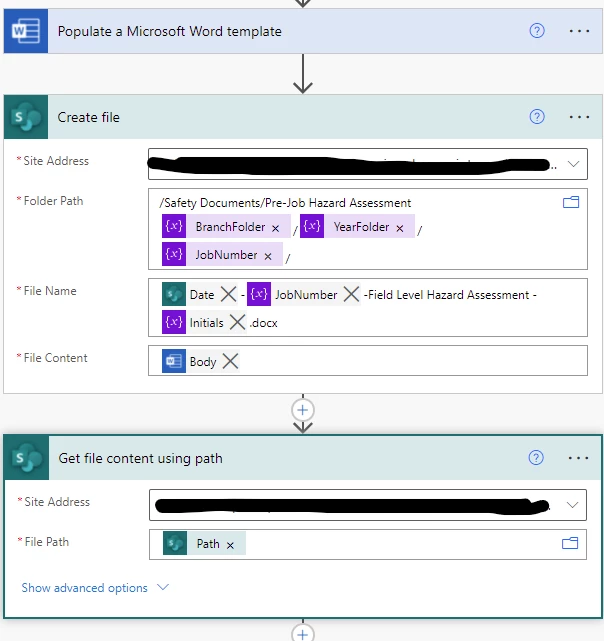
The error message after 8 tries is this: 
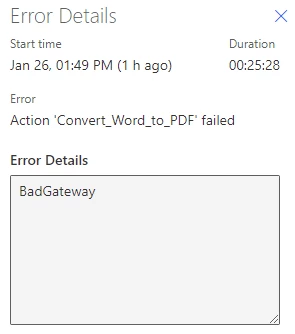
I'm sure that I've just missed something, but I can't for the life of me figure out what I've done wrong.


I have other flows that are pdfing well with the same credentials.

This topic has been closed for replies.

1 reply

Participant
March 9, 2022

Hi,


Since no one else has answered, I thought I'd chime in. I have also been struggling with the Bad Gateway error while trying to merge two flows with Adobe PDF Services modules. I am using Merge PDFs, and until yesterday I could not make it work (has worked fine in the past). What I've found is, that it seems that Adobe may have updated/changed the module in the past few weeks. If I try using the PA template "Merge all SharePoint content into a PDF with the click of a button", the module works fine - but when I create a near-identical flow from scratch, I get "Bad Gateway". 


My suspicions arose when I used the "Peek code" function on both flows, and found that they are different:


Standard module (doesn't work)

{
"inputs": {
"host": {
"connection": {
"name": "@parameters('$connections')['shared_adobepdftools']['connectionId']"
}
},
"method": "post",
"body": {
"outputFileName": "test.pdf",
"files": "@variables('PDFfiles')"
},
"headers": {
"x-api-key": "PowerAutomate"
},
"path": "/operation/v1/combinePDF",
"authentication": "@parameters('$authentication')"
},
"metadata": {
"operationMetadataId": "xxxxxxxxxxxxxxxxxxxxxxxx",
"flowSystemMetadata": {
"swaggerOperationId": "CombinePDF"
}
}
}


And the module from the template:


{
"inputs": {
"host": {
"connectionName": "shared_adobepdftools_1",
"operationId": "CombinePDF",
"apiId": "/providers/Microsoft.PowerApps/apis/shared_adobepdftools"
},
"parameters": {
"Files Array/outputFileName": "mergedTEST.pdf",
"Files Array/files": "@variables('PDFfiles')"
},
"authentication": "@parameters('$authentication')"
},
"metadata": {
"operationMetadataId": "xxxxxxxxxxxxxxxxxxxxxxxxxxx"
}
}


Clearly these modules are not the same, even though they both are named "Merge PDFs". Have others come to the same conclusion?


But try to find the module in a PA template, maybe you can copy it as I did. Good luck!


/Jacob