
Participant
May 31, 2022
Question

bookmark panel not showing scrollbar on adobe embedded

  • May 31, 2022
  • 1 reply
  • 843 views

Hi Team, I am refereing below document for abobe annotation.

https://developer.adobe.com/document-services/docs/overview/pdf-embed-api/howtos_ui/#


I am using below configuration to enable or disable the icons,

viewerConfig = {
defaultViewMode:"FIT_WIDTH",
showAnnotationTools: true,
enableAnnotationAPIs: true,
showLeftHandPanel: true,
includePDFAnnotations: false,
enableFormFilling: false,
dockPageControls: false,
};


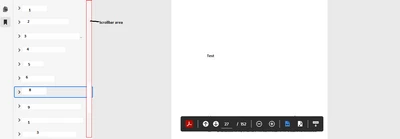
My problem is i am not able to scrollbar on bookmark panel.How do i enable is?


This topic has been closed for replies.

1 reply

Kyle Jule22336618
Participating Frequently
June 1, 2022

Hi there,

The scrollbar on the bookmarks panel is not visible unless it's actively being used. I can see how that could be a bit confusing.

If you indeed have enough bookmarks expanded in the panel to necessitate a scroll bar, put your cursor over the bookmarks panel and then use your mouse wheel to scroll down. You should then see that there is indeed a scroll bar and the panel should scroll down.

If you're still having issues please let us know.

Kyle Jule22336618
Participating Frequently
June 1, 2022

I was able to determine this behaviour of the scroll bar using the Embed API playground, which you might find useful: 
https://documentcloud.adobe.com/view-sdk-demo/index.html#/view/FULL_WINDOW/Bodea%20Brochure.pdf


Note: You'll need to provide a PDF that has a large number of bookmarks for the scrolling to be enabled.