
Inspiring
April 14, 2023
Answered

Difficulty using PowerAutomate to Generate a document from Word Template

  • April 14, 2023
  • 3 replies
  • 1848 views

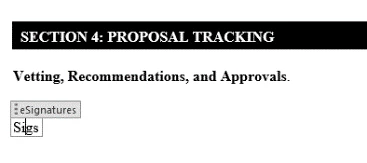
I have created a template that has one field in it, a Rich Text Field named eSignatures.  It has some placeholder text "Sigs" in it.
In my flow, I retrieve the file (from OneDrive), and then have a step where I am wanting to put Michelle in the Rich Text field and create a new doc. 
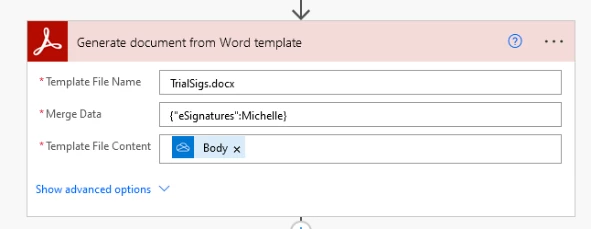
Then I save it with a new name (in Sharepoint), and when I view it it sill has the placeholder text 'Sigs' insteade of Michelle.


What am I doing wrong here?

    This topic has been closed for replies.
    Correct answer Michelle29398488asp4

    Finally fixed it.  The problem was with the template.  Should not have had a Rich Text controll field.  Just {{eSignatures}} as plain, boring text.

    3 replies

    Inspiring
    April 14, 2023

    I have created a template that has one field in it, a Rich Text Field named eSignatures.  It has some placeholder text "Sigs" in it.

    In my flow, I retrieve the file (from OneDrive), and then have a step where I am wanting to put Michelle in the Rich Text field and create a new doc. 


    Then I save it with a new name (in Sharepoint), and when I view it it sill has the placeholder text 'Sigs' insteade of Michelle.


    What am I doing wrong here?

    Michelle29398488asp4AuthorCorrect answer
    Inspiring
    April 14, 2023

    Finally fixed it.  The problem was with the template.  Should not have had a Rich Text controll field.  Just {{eSignatures}} as plain, boring text.

    Inspiring
    April 14, 2023

    Can you put me in the PowerAutomate forum, or AdobePDF services, or wherever I belong.  I'm sorry if I originally posted in the incorrect place.

    jane-e
    Community Expert
    Community Expert
    April 14, 2023

    Can you put me in the PowerAutomate forum, or AdobePDF services, or wherever I belong.

    By @Michelle29398488asp4


    Hi Michelle,


    PowerAutomate is Microsoft (I just looked it up.) I can't move you from the Adobe forums to the Microsoft forums, but I've found the link to the Microsoft forums for PowerAutomate for you:

    https://powerusers.microsoft.com/t5/Get-Help-with-Power-Automate/ct-p/FL_GeneralDiscussions


    I've moved this post to Acrobat.


    Jane


    Inspiring
    April 14, 2023

    Thank you Jane for the link.  But I have found the forum this should have been (Acrobat Servvices API), and posted my query there.  Could you remove this thread?

    jane-e
    Community Expert
    Community Expert
    April 14, 2023

    @Michelle29398488asp4 

    Moved from the Using the Community forum (for questions about the forums). You might be using Adobe Sign, based on your images. If not please tell us the application and we can move your post again.

    Jane

    Inspiring
    April 14, 2023

    This is not in Adobe sign.  This is populating a field in a word document, that just happens to be called "eSignatures".  


    Eventually, I will be taking JSON data (from one of the columns in the Sharepoint directory), and merging that into the template, once I make sure the basic opperation is working properly.