
bruceb92825582
Participant
May 11, 2022
Question

Document Generation: Conditional Content with table cells

  • May 11, 2022
  • 3 replies
  • 2054 views

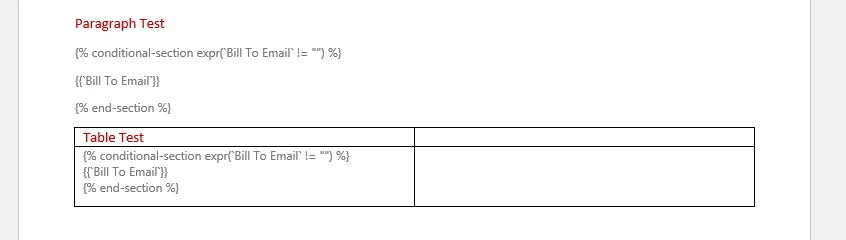
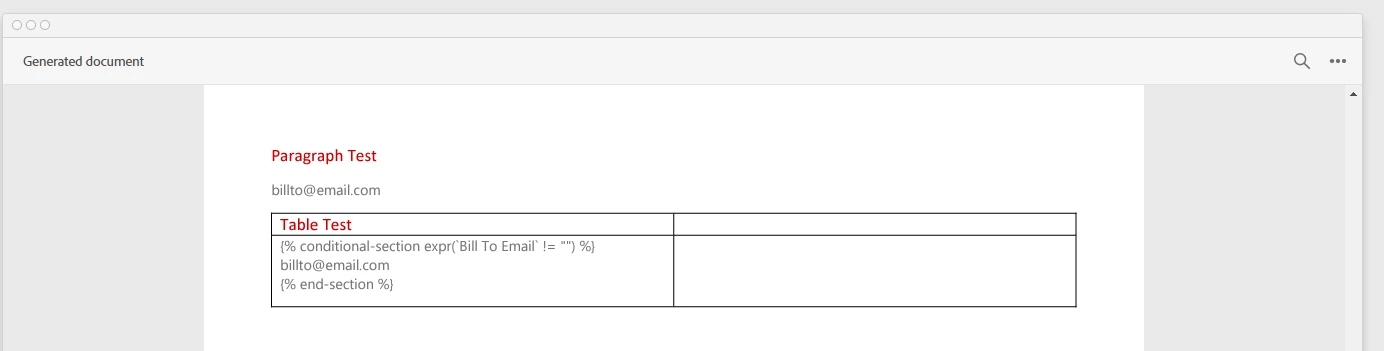
I have found that when using the Conditional Content feature and inserting the condition inside of a table cell, the conditional-section gets rendered in the PDF output. If the same conditional section is used in a normal paragraph it gets evaluated correctly.  If this is the expected behaviour then this is a major limitation of the service. 


Word Template:
 

Rendered PDF:
 

    This topic has been closed for replies.

    3 replies

    Participant
    March 6, 2024

    Same issue.. it's pretty obscene that it takes 2 years to resolve something as simple as adding a line break in a table cell.. @Raymond Camden any updates?

    Raymond Camden
    Community Manager
    Community Manager
    March 6, 2024

    Check out the new table tags - it should correct this issue. 


    https://developer.adobe.com/document-services/docs/overview/document-generation-api/tablewithmarkers/


    Participant
    October 16, 2023

    Has this been resolved? I still seem to be having the issue and this was reported over a year ago.

    Raymond Camden
    Community Manager
    Community Manager
    October 17, 2023

    We should have a resolution very soon for this - can't say specifically, but very soon.

    Raymond Camden
    Community Manager
    Community Manager
    May 12, 2022

    I apologize, but yes, it is a known (and internally reported), limitation. If I get an update, I'll share.

    Participant
    November 21, 2022

    We're running into the same limitation. Is there any solution for this yet?

    Raymond Camden
    Community Manager
    Community Manager
    November 21, 2022

    Not yet. Obviously you could do it yourself before sending the data. So for example, if you want to conditionally change text in rows of data, you can process that before sending it to the API.