
Question
Error when trying to Embed PDF API on website
I have tried numerous versions of this code to and I'm still getting some kind of error. The latest indicates that my API credentials do not include the domain I'm using. Here's the error:
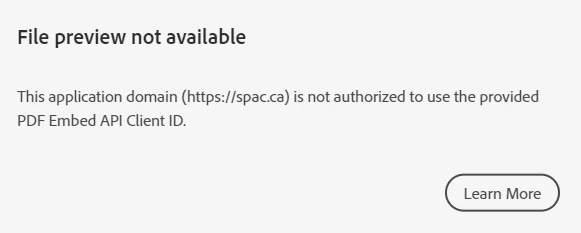
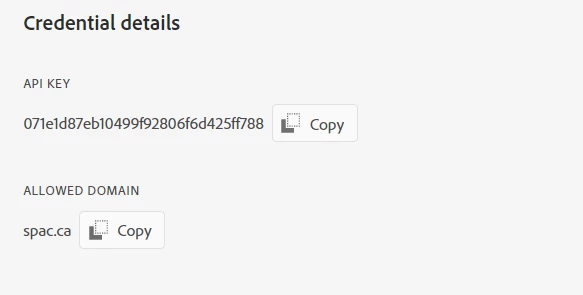
This is a screen shot of the page on Adobe Console that shows the credentials along with the domain registered
This is the code I'm using for the Light Box version that includes my credentials and the pdf direct link (from our domain).
<!DOCTYPE html>
<html>
<head>
    <title>Adobe Document Services PDF Embed API Sample</title>
    <meta charset="utf-8"/>
    <meta http-equiv="X-UA-Compatible" content="IE=edge,chrome=1"/>
    <meta id="viewport" name="viewport" content="width=device-width, initial-scale=1"/>
    <script type="text/javascript" src="index.js"></script>
</head>
<!-- Customize page layout style according to your need and PDF file for best viewing experience -->
<body style="margin: 0px; background-color: #fdfdf9;">
<button type="button" onclick="previewFile()" style="cursor: pointer; width: 120px; padding: 10px; font-family: 'Source Sans Pro'; font-size: 15px; color: #ededed; border-radius: 5px; border: 1px #404040; background-color:#22a2cd margin: 100px 0 0 80px;">View Annual Report</button>
    <script src="https://documentcloud.adobe.com/view-sdk/main.js"></script>
<script type="text/javascript">
	document.addEventListener("adobe_dc_view_sdk.ready", function(){
		var adobeDCView = new AdobeDC.View({clientId: "<071e1d87eb10499f92806f6d425ff788>"});
		adobeDCView.previewFile({
			content:{location: {url: "https://spac.ca/Content/ExternalSite/Documents/Congregational%20Meetings/2019/Annual%20Financial%20Report%20-%20Final.pdf"}},
			metaData:{fileName: "Annual Report.pdf"}
		}, {embedMode: "LIGHT_BOX"});
	});
</script>
</body>
</html>
Another thing that happens is that the web page runs that error as soon as it loads and I can't get back in to edit that block, I have to delete the entire page and start again.
What should I be doing differently?


 AdChoices