
Participant
February 25, 2025
Question

Keep bookmarks from Word when creating PDF

  • February 25, 2025
  • 1 reply
  • 309 views

In Word, when saving as PDF, there is an option to include existing bookmarks in the PDF:
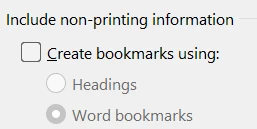
 

When creating the PDF using PDF Services API, the bookmarks are not included.

Is there an option to include them? If not, are there workarounds/ideas how to do it?

I need the existing bookmarks from Word to appear in the PDF.


Thank you.

1 reply

Joel Geraci
Community Expert
Community Expert
February 25, 2025

Currently, the API will only convert headings to PDF Bookmarks. There is no work around at this time other than to use headings rather than bookmarks. I'm going to add this as a feature request. 

ribeiroiAuthor
Participant
February 25, 2025

Thank you. Yes, I think this is an important feature. In our case, bookmarks were created in Word already, and they should be reflected in the PDF (just like when saving from Word to PDF and checking the option to include bookmarks).