Participant
April 14, 2021
Question

Merging multiple documents to PDF using Microsoft Flow getting error "For application/pdf mime-type"

  • April 14, 2021
  • 2 replies
  • 7856 views

Hey, My requirement is to merge multiple document into pdf using Microsoft Flow but every time getting error ("For application/pdf mime-type The input file appears to be corrupted and cannot be processed.;...-PowerAutomate").

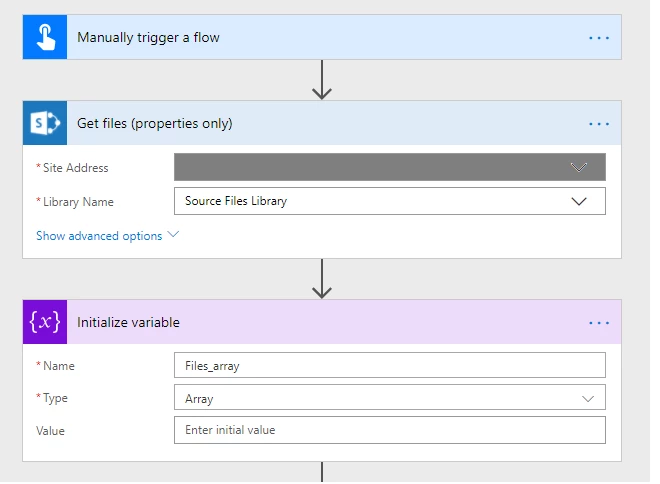
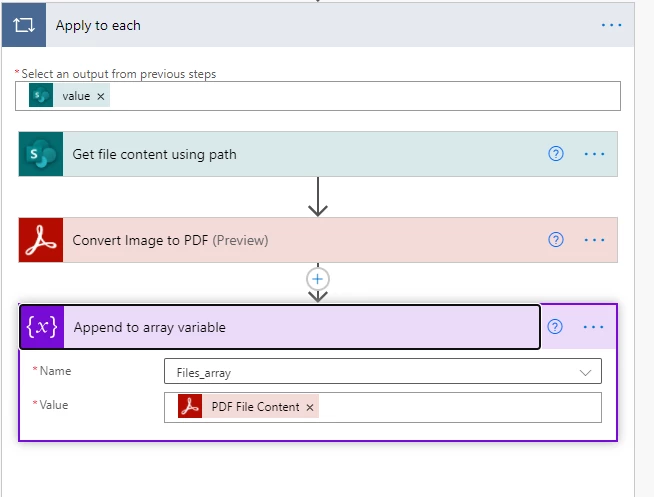
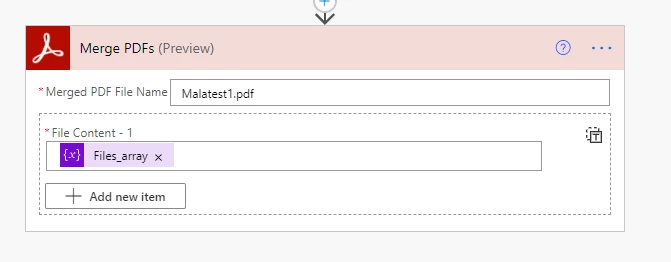
Below are the step which implemented in my flow with screenshot  : 

  1. Flow trigger. (manually)
  2. Get files (properties only) We start with getting properties of all our DOCX files stored in a specific folder - Source Files Library. ...
  3. Initialize Array variable. ...
  4. Get file content using path. ...
  5. Convert DOCX to PDF. ...
  6. Append to an array variable. ...
  7. Merge PDF. ...


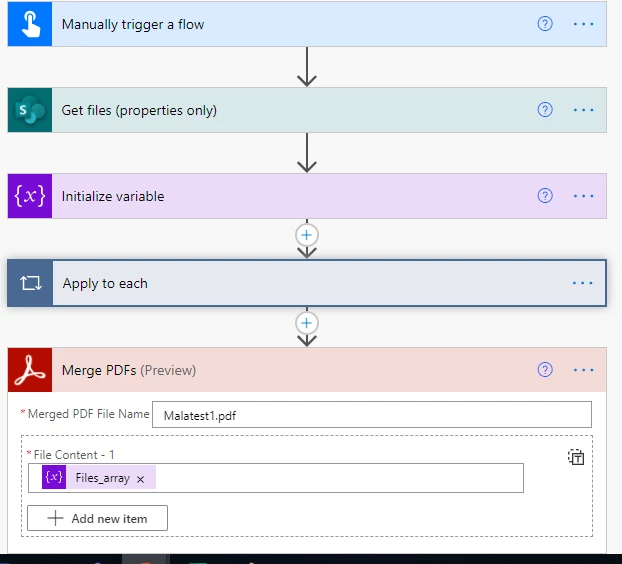
Full Flow : 

Please let me know how I can merge multiple document into single pdf using Adobe Connector from Microsoft Flow. Currently using the above flow getting error  ("For application/pdf mime-type The input file appears to be corrupted and cannot be processed.;...-PowerAutomate") but the document are not corrupted.

This topic has been closed for replies.

2 replies

Ben Vanderberg
Community Manager
Community Manager
April 18, 2021

It looks like you are inserting an array object into an individual item. Click the Button in the image attached to switch to JSON data mode and then clear everything and set your array variable. 

Participant
April 19, 2021

Hi Ben,


I am deffinately working with the JSON type editor, as the individual item shows "File 1, File 2, File n, etc."

Additionaly, the "File content" from the Get File Content card returns a 2D array which has 

"$content-type" 
&
"$content"

as its elements.

The array created in the image above "Append to array variable 8" returned, 

{"$content-type":"Document Library","$content":{"$content-type":"application/pdf","$content":"JVBERi0xLj~"}}

 which im assuming is not correct.


I have changed the array i am inputting into the "Merge PDF" card (resulting in the below structure), but am still receiving a "Bad Gateway" error.

Can you tell me the syntax expected by the "Merge PDF" card is?

Does it expect

[
{
"$content-type":"application/pdf",
"$content":"JVBERi0~"
}
{
etc.
}
]

 or is there some issue with the syntax of the "$content-type" element ("application.pdf" maybe?)


Thankyou for your help!


Ben Vanderberg
Community Manager
Community Manager
May 18, 2021

Hi @Thomas5C18 ,


I tried to replicate your type of flow locally. It seems to be working on my end. A few things:

  • Absolutely sure that you are passing all PDF documents to Merge PDF action? If not, then you need to convert beforehand. 
  • Make sure your $content-type is application/pdf. If it isn't, Merge PDF will reject it. 
  • You can't just pass the file content into the array because Merge PDF is strict that it will only accept $content-type and $content in the object.


Below is an image to help illustrate an example that is working. It seems like it is probably something little like a wrong mime-type or something else. Out of curiosity, check to see if you write the content type static, does it make a difference?


Ben Vanderberg
Community Manager
Community Manager
April 14, 2021

Have a look at the solution in this thread about creating an object to pass the content type and file content:

https://community.adobe.com/t5/document-services-apis/power-automate-split-and-merge-the-split-output-array/td-p/11953547

This is a common in many Power Automate scenarios. 

MAla5C4DAuthor
Participant
April 14, 2021

Thank you so much for the reply. After implementing content type in array still getting the same issue . Below is the screenshot:


but still getting the same issue .


Please help me on the above issue. Awaiting your response!