
Participant
October 2, 2021
Answered

PDF documents can not be found on the server

  • October 2, 2021
  • 2 replies
  • 2137 views

I don't know, what's wrong here? I'm always getting the error message:

The requested document was not found on this server.

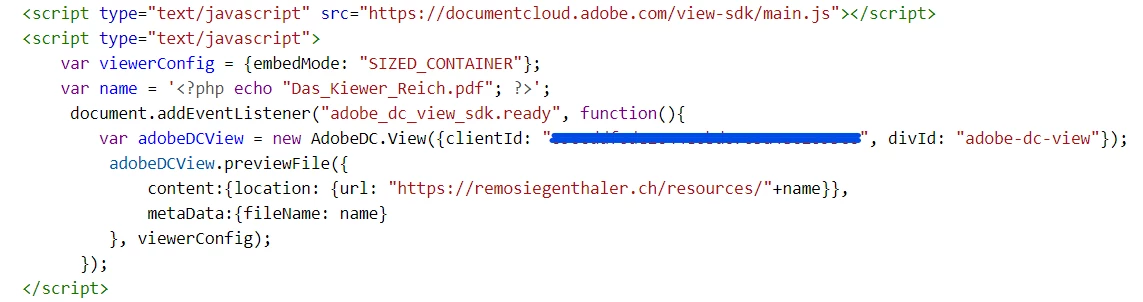
<script src="https://documentcloud.adobe.com/view-sdk/main.js"></script>
    <script type="text/javascript">
	document.addEventListener("adobe_dc_view_sdk.ready", function(){
           var name = '<?php echo $_GET["p3"]; ?>';
           var directory = 'https://domain.xy/resources/';
	   var adobeDCView = new AdobeDC.View({clientId: "key", divId: "adobe-dc-view"});
		       adobeDCView.previewFile({
			          content:{location: {url: directory.concat(name)}},
			          metaData:{fileName: name}
		       }, {embedMode: "SIZED_CONTAINER"});
	      });
    </script>

 The pdf-files are stored in the directory "resources" under the domain "domain.xy". 
This topic has been closed for replies.
Correct answer Remo5FFE

The origin problem can be marked as solved. With the hard coded name of the PDF file, it works. 

So now, I have to find out, why it does not work, with dynamic values for the variable "name". But that is a different story.

Thank you guys!

2 replies

Remo5FFEAuthorCorrect answer
Participant
October 4, 2021

The origin problem can be marked as solved. With the hard coded name of the PDF file, it works. 

So now, I have to find out, why it does not work, with dynamic values for the variable "name". But that is a different story.

Thank you guys!

Ben Vanderberg
Community Manager
Community Manager
October 3, 2021

I don't think there is enough information to be able to troubleshoot your issue, but have you checked to output your directory.concat(name) and see if it correctly passes your URL to the PDF? If you do that, and you just go to it in your web browser, does it resolve? 


PDF Embed API is client-side, so that means that any CORS issues apply. If you aren't on the same domain, then your web browser might be preventing cross-domain loading. Usually you can see this in the errors in your console.log. Another possible way to address this in your PHP script is to read the foreign location, load it as base64:

https://codepen.io/practicalPDF/pen/vYLoKMj

Remo5FFEAuthor
Participant
October 3, 2021

Thank you, Ben, for this quick reply.

I checked the "directory.concat(name)" code. It works: the output is leading to the PDF. But I still get the error: The requested document was not found on this server., when I let the server do the work.

Any further Ideas? I give more pictures as attachements to be able to troubleshoot the problem.

Legend
October 3, 2021

Have you actually reported the value of  directory.concat(name)? I don't see that in your screen shots, and that's what matters.