

Question
Pdf Embed Api, when the view is small, the search bar is cut off when opened, not able to see full search bar
When the view div width is small, the search bar does not fully show. To reproduce this following code can be used
<div style="width:35%">
<div id="adobe-dc-view"></div>
</div>
<script src="https://acrobatservices.adobe.com/view-sdk/viewer.js"></script>
<script type="text/javascript">
// Store the UI options in a constant
const previewConfig = {
   embedMode: "FULL_WINDOW",
   showDownloadPDF: false,
   showZoomControl: false
}

document.addEventListener("adobe_dc_view_sdk.ready", function () {
   var adobeDCView = new AdobeDC.View({clientId: "<YOUR_CLIENT_ID>", divId: "adobe-dc-view"});
   // Consume previewConfig here. . .
   adobeDCView.previewFile({
      content:{location: {url: "https://acrobatservices.adobe.com/view-sdk-demo/PDFs/Bodea Brochure.pdf"}},
      metaData:{fileName: "Bodea Brochure.pdf"}
   }, previewConfig);
});
Notice the parent div of adobe-dc-view has 35% width. Now when the pdf is rendered, if we try to open search bar, the search bar gets 100% width, which normally it does not get say when the parent div has width 50%.
Due to this 100% and margin etc, the search does not show properly and is cut off . Please refer to image below
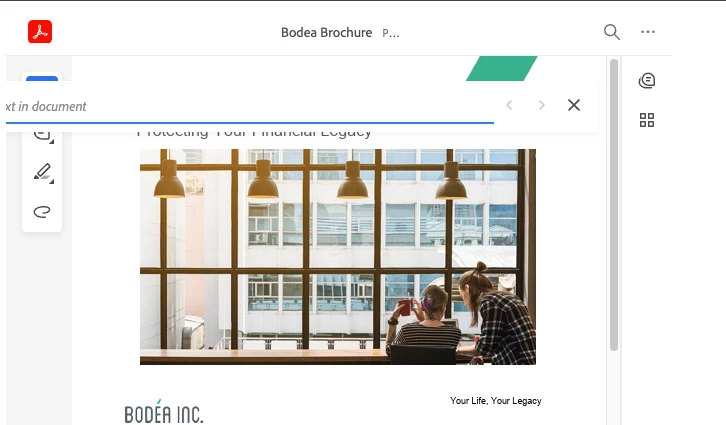
Is there any way to make the search bar correct?


 AdChoices