
PDF Extract Service API fails with Error Code 400 BAD_PDF_FILE_TYPE
Hello, I am creating a workflow in n8n.io to automatically convert PDFs using the Extract Service API.
My problem is that no matter which pdf document I upload I always get the following error message from the API server:
[
{
"body":{
"error":{
"code":"BAD_PDF_FILE_TYPE",
"message":"BAD_PDF - Unable to extract content.: The input file is not a PDF file",
"status":400
},
"status":"failed"
},
"headers":{
"server":"openresty",
"date":"Sat, 31 Dec 2022 11:23:41 GMT",
"content-type":"application/json;charset=UTF-8",
"content-length":"152",
"connection":"close",
"x-request-id":"OqxZOhbXq4jkY7HcTsfK2QxftFbaE4fw"
},
"statusCode":200,
"statusMessage":"OK"
}
]
When I send the API call "Get asset metadata" I get the following response:
[
{
"body":{
"entity":"02A1570D63AF3AED0A495FA9@techacct.adobe.com",
"type":"application/pdf",
"size":20842
},
"headers":{
"server":"openresty",
"date":"Sat, 31 Dec 2022 11:28:02 GMT",
"content-type":"application/json;charset=UTF-8",
"content-length":"94",
"connection":"close",
"x-request-id":"kN9dtQUe3EmfWCkG4b4wsatTcaCensx6"
},
"statusCode":200,
"statusMessage":"OK"
}
]
The file size shown in the response matches the size of the file I uploaded and also the type is application/pdf. So it seems to me that the file was correctly uploaded.
The upload to the server is done as binary payload in Step2 mentioned here:
https://developer.adobe.com/document-services/docs/overview/pdf-services-api/howtos/api-usage/
My current workflow in n8n.io
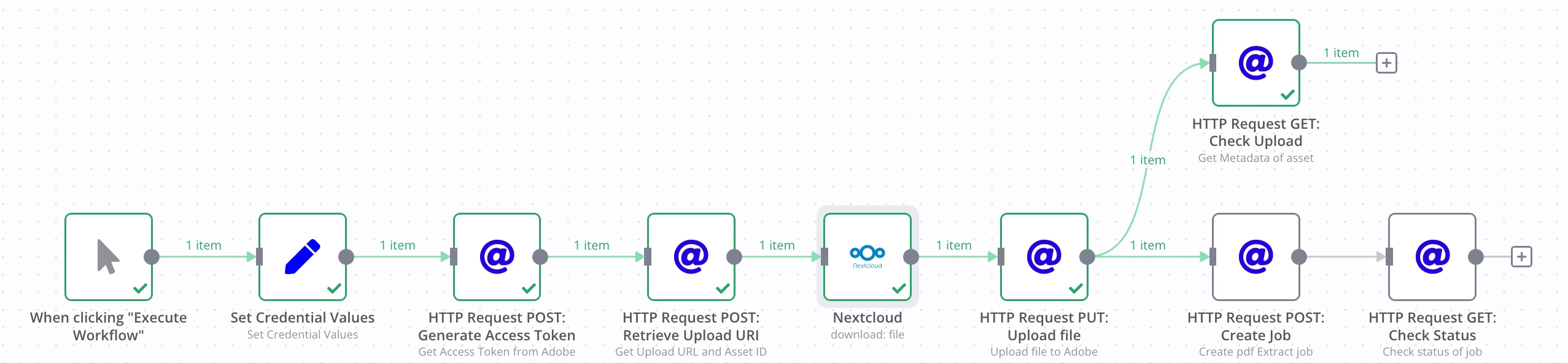
The PDF Document I use for testing is also attached.
What am I doing wrong, where is the mistake?


 AdChoices