


Known Participant
Nov 6, 2023 6:33 PM UTC
Answered

PDF Services API: Document Generation

I am attempting to use PDF Services Document Generation Module via Adobe Fusion. No matter what value I place into the Data for Merge parameter I cannot get the JSON object to work. I have tried as a string, and as a Collection, I have tried as a single param and a mapped param. No combination seems to work. I'm just looking for someone who has gotten this to work before.


I can put in hard-coded individual values and get it to work but that is not very useful when I have many documents each with a unique structure, I don't want to have to set up a single module for every file we have. Any guidance would be great, thanks!
This topic is closed to new replies. Start a new post to keep the conversation going.
wes.adobeCorrect answer
Adobe Employee
Nov 6, 2023 7:38 PM UTC

Hi Graham,
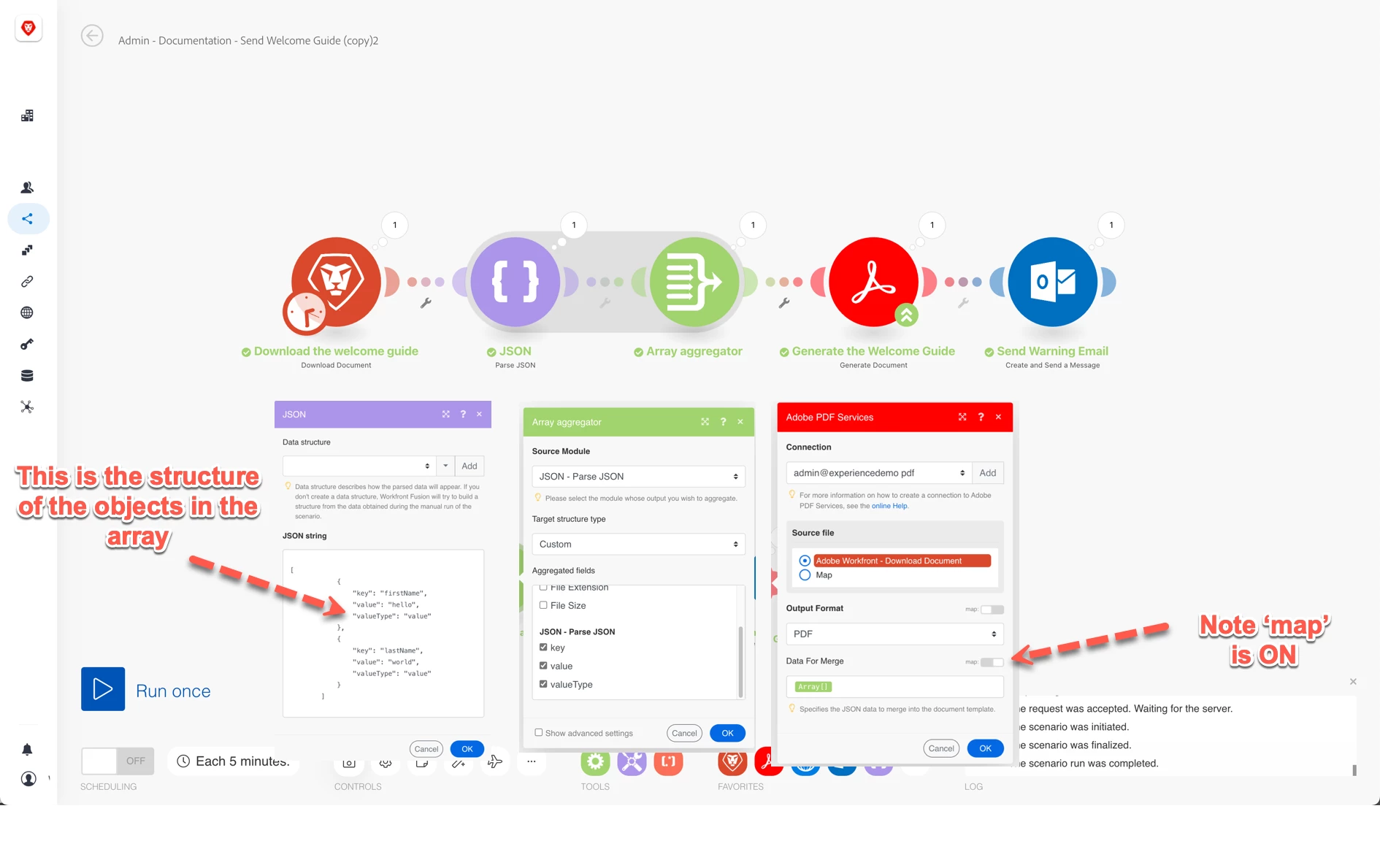
It's possible.  You just need to pre-generate the arguments as an Array[] with each element in the array conforming to the syntax of { "key": "X", "value":"Y", valueType: "Z" }.  Instead of specifying the values individually in the PDF module, you turn the 'map' switch on so you can pass this array.


Here's an arbitrary example that downloads a template from Workfront, makes the aforementioned Array with some hello world values, makes the PDF, and then sends it to myself.


22 replies

wes.adobeCorrect answer
Adobe Employee
Nov 6, 2023 7:38 PM UTC

Hi Graham,
It's possible.  You just need to pre-generate the arguments as an Array[] with each element in the array conforming to the syntax of { "key": "X", "value":"Y", valueType: "Z" }.  Instead of specifying the values individually in the PDF module, you turn the 'map' switch on so you can pass this array.


Here's an arbitrary example that downloads a template from Workfront, makes the aforementioned Array with some hello world values, makes the PDF, and then sends it to myself.


Translate
Known Participant
Nov 6, 2023 8:02 PM UTC

Thanks for your reply.  I tried setting mine up in the same way however, I seem to be getting a missing value error coming from the valueType field. Which is odd because I am not exposing it. See the runtime error below.


Translate
Adobe Employee
Nov 6, 2023 8:12 PM UTC

Check the contents of json_string.  It should look like this:


[

  {

    "key":"Field_1",

    "value":"Field_1_Value"

    "valueType":"value"

  },

    "key":"Field_2",

    "value":"Field_2_Value"

    "valueType":"value"

}

]


You'll need to adjust your aggregator after you change the structure to now collect the field,fieldType,valueType instead of field_1,field_2

Translate