
Participant
January 18, 2024
Answered

PDF To Word
  • January 18, 2024
  • 2 replies
  • 825 views


I want to convert PDF to word document in Swift ios. With the help of rest API.
I follow the steps

1. genrate token -> https://pdf-services.adobe.io/token

2. genrate upload uri -> https://pdf-services.adobe.io/assets

3. upload the pdf file at the given path

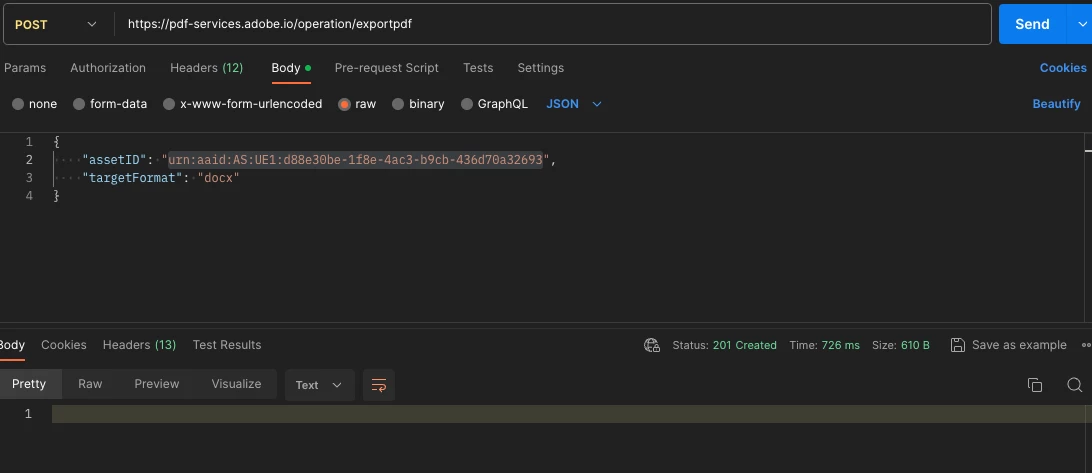
4. again export pdf in docx -> get response 201 https://pdf-services.adobe.io/operation/exportpdf
5. now I am unable to check the status https://pdf-services.adobe.io/operation/compresspdf/urn:aaid:AS:UE1:d88e30be-1f8e-4ac3-b9cb-436d70a32693/status
6. and i have also no idea about how i can download docx file

This topic has been closed for replies.
Correct answer madalinad32529237

You need to use 'x-request-id' from the Export PDF response in the last url. Not the Asset ID. 

You can get the full url from your previous response (step 4) -> 'location' header.

i.e.

https://pdf-services.adobe.io/operation/exportpdf/x-request-id/status

2 replies

Raymond Camden
Community Manager
Community Manager
January 18, 2024

Eh, I'm not sure about that answer. Technically, when you create the job, you should check the Location header in the response. That's a URL that can be used as is - ie just hit the URL (with a x-api-key containing your client id and authorization bearer token).

madalinad32529237Correct answer
Participant
January 18, 2024

You need to use 'x-request-id' from the Export PDF response in the last url. Not the Asset ID. 

You can get the full url from your previous response (step 4) -> 'location' header.

i.e.

https://pdf-services.adobe.io/operation/exportpdf/x-request-id/status