


Inspiring
Nov 29, 2023 4:46 PM UTC
Answered

Protected PDF does not respect AnnotationManager Settings

No matter what the annotation manager settings are, if the PDF is protected (comments and annotations disabled), the annotation manager settings are not respected.


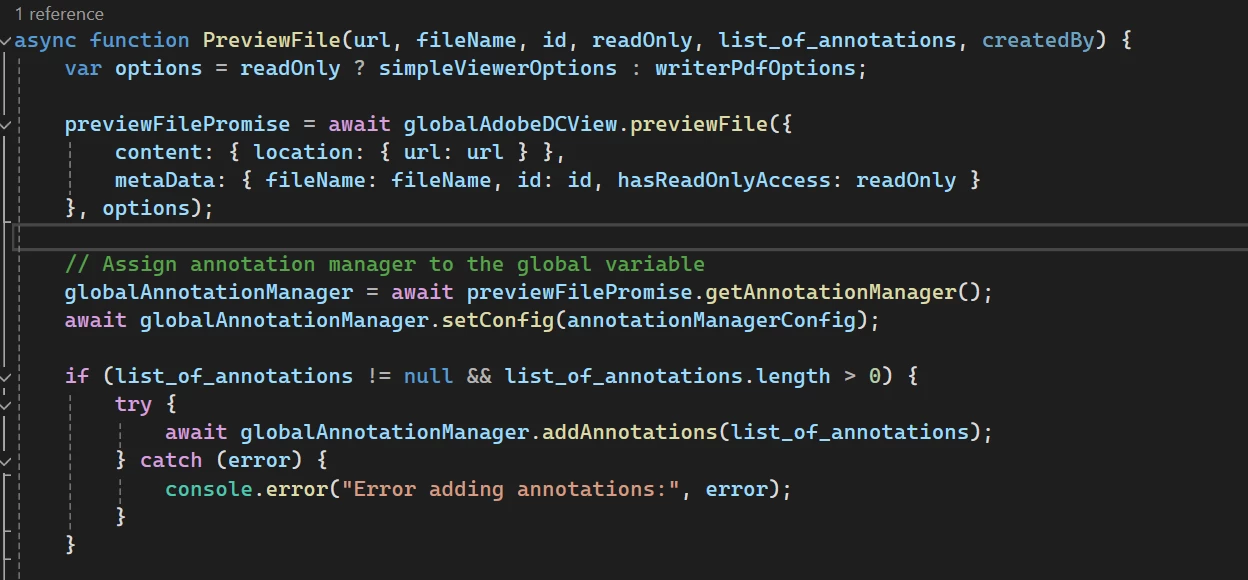
It will show the comments panel and toolbar even though the pdf is protected. This is because the exception is thrown before the annotationManager setConfig call, and there is really nothing i can do about it.



    This topic is closed to new replies. Start a new post to keep the conversation going.
    Garrett28259082qfbfCorrect answer
    Inspiring
    Dec 11, 2023 11:27 PM UTC

    We have no way of knowing whether the document is protected or not. When getting a reference to the annotation manager, and calling setConfig, it fails because the document doesn't allow APIs at all


    8 replies

    Inspiring
    Dec 9, 2023 11:06 PM UTC

    @Raymond Camden any input on how I hide comments panel on a protected PDF?

    Translate
    Raymond Camden
    Community Manager
    Community Manager
    Dec 11, 2023 3:23 PM UTC

    I'm not sure how you are doing it - but in my test, I disabled commenting/annotating  on a PDF. In Embed, I set annotation tools to false, showAnnotationTools: false, and when loaded, it did not let me annotate or add comments, nor it have an icon fo the comments panel.


    Now - are you trying to get _existing_ annotations via the API and finding that it opens up the panel or somesuch?

    Translate
    Inspiring
    Dec 11, 2023 10:53 PM UTC

    The document has to be protected

    Translate