
Participant
November 25, 2024
Question

Request for improvement: Cannot extract Japanese text from table, but Acrobat Pro DC can.

  • November 25, 2024
  • 2 replies
  • 613 views

Hi, I would like to extract English and Japanese text from tables in PDF, which is made by scanning printed paper.


Original PDF:
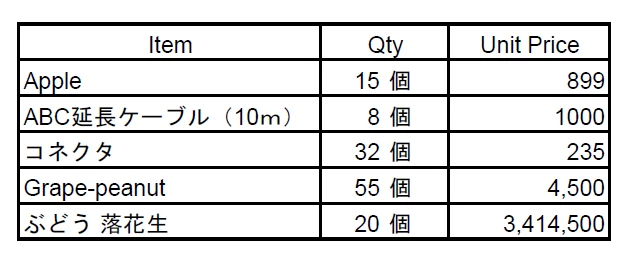
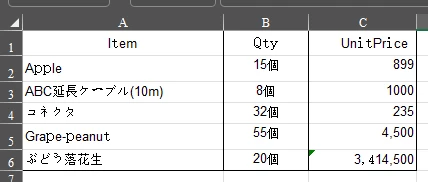
When I use Acrobat Pro DC(Convert to xlsx), the output quality is good.
 

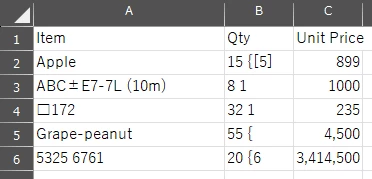
But when I use Adobe PDF Services API(extract_text_table_info_figures_tables_renditions_from_pdf.py), I get garbled text for the Japanesse text. 


I know the API is currently optimized for English language content. 

But is it possible to improve this API to the quality of Acrobat Pro DC?

Beacuse I need to convert many PDFs, so I need CLI solution.

I attach the original Excel and PDF file, so please use these as test data.

Thank you.

2 replies

Participating Frequently
September 20, 2025

How did you even get the first result? When I convert to Excel from within Acrobat, I get pure gibberish, like your second screenshot.


@Altadena not on par? Issues with Japanese text and OCR have been an issue for as long as I can remember and the app constantly bugs with AI pop-ups when it can't even do the basics!

Adobe Employee
November 27, 2024

Hi,


As you mentioned, Acrobat Extract API is optimized for English but it would work in Japanese with considerable precision. I tried the sample pdf you attached in https://acrobatservices.adobe.com/dc-visualizer-app/index.html, the table was extracted correctly.

I did not try with python.

saki_5656Author
Participant
November 27, 2024

Hi, thank you for taking your time for my request.

And I am sorry, I didn't explain well.

To reproduce the problem, you need to print out the original PDF and scan it and use it.

I attached the original PDF to show you the difference between the PDF made from digital data and scanned PDF.

I attach the scanned PDF this time. I hope this works the same as me.

Thank you.

Adobe Employee
November 29, 2024

Hi, 

Thank you for the clarification. Currently, the quality of Japanese OCR provided by the Extract API is not on par with that of Acrobat desktop OCR. We understand the importance of delivering high-quality OCR results and are committed to making improvements. Your feedback is valuable to us as we strive to enhance this feature.