
Stop comments pane from opening with every annotation
Hi,
I'm building a tool, that compares article numbers on two different documents and highlights the article numbers that couldn't be found in the other document. I'm creating an array of annotations in the backend, which I'm sending to adobe with the file as follows:
var viewerConfig = {
      enableAnnotationAPIs: true,
      includePDFAnnotations: true,
      showCommentsPane: false
   };
document.addEventListener("adobe_dc_view_sdk.ready", function(){

      var adobeDCView = new AdobeDC.View({clientId: "i put my id here", divId: "adobe-dc-view2"});
      var previewFilePromise = adobeDCView.previewFile(
      {
         content:   {location: {url: "{% static 'pdfs/adobe/doc2.pdf' %}"}},
         metaData: {fileName: "doc2.pdf", id: "{{docId}}"},
      }, viewerConfig);

      var annotations = '{{annotations}}'.replace(/'/g,"\"");
      console.log(annotations)
      annotations = JSON.parse(annotations)

      previewFilePromise.then(function (adobeViewer) {
         adobeViewer.getAnnotationManager().then(function (annotationManager) {

            const customFlags = {
               showCommentsPane: false,
            }

            annotationManager.addAnnotationsInPDF(annotations)
               .then(function (result) {
                  console.log("Annotations added to PDF successfully and updated PDF buffer returned.", result)
               })
               .catch(function (error) {
                  console.log(error)
               });

            annotationManager.setConfig(customFlags)
                           .then(() => console.log("Success"))
                           .catch(error => console.log(error));
         });
      });
   });
It does work, however I'm sending a lot of annotations, which take a while to be processed and therefor when the viewer already shows the document, the annotations are still being generated for a while.
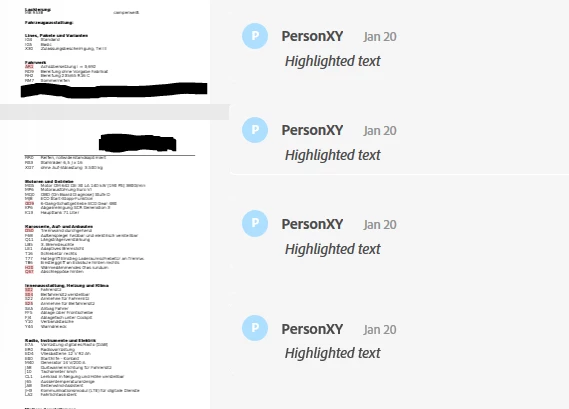
During this time of generating the annotations, the user can't click away the comments pane and even if he does, it opens back up again with the next annotation. If possible, I would like to just hide the comments pane during this time, but I don't know how. I have tried using the "showCommentsPane" configuration, but it doesn't seem to make a difference in my case. Or maybe I'm just doing something wrong. Is there a way to do this?
Thanks in advance!


 AdChoices