
Question
This application domain is not authorized
I'm having issues getting a "domain is not authorized error" when I attempt to utilize the PDF Embed API.
The error is:
"File preview not available. This application domain (https://generation180.org) is not authorized to use the provided View SDK Client ID."
I'm referencing this article for how to accomplish this: https://www.labnol.org/embed-pdf-200208
I also found this post which I tried the steps but they don't work either. https://community.adobe.com/t5/document-services-apis/file-preview-not-available-domain-not-authorized/m-p/11180446?page=1#M273
Here is the PDF I'm trying to embed: https://generation180.org/wp-content/uploads/2020/07/SSVAPressRelease_v04EMBARGOED.pdf
Here are the credentials:
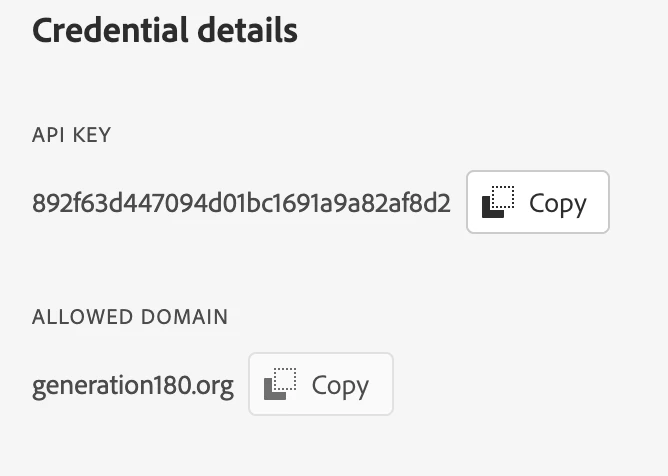
Here are the credentials:
And here is my code:
<div id="adobe-dc-view" style="width: 800px;"></div>
<script src="https://documentcloud.adobe.com/view-sdk/main.js"></script>
<script type="text/javascript">
document.addEventListener("adobe_dc_view_sdk.ready", function(){
var adobeDCView = new AdobeDC.View({clientId: "<892f63d447094d01bc1691a9a82af8d2>", divId: "adobe-dc-view"});
adobeDCView.previewFile({
content:{location: {url: "/wp-content/uploads/2020/07/SSVAPressRelease_v04EMBARGOED.pdf"}},
metaData:{fileName: "Summary.pdf"}
}, {embedMode: "IN_LINE"});
});
</script>
I've also tried the code with the full URL of the PDF:
<div id="adobe-dc-view" style="width: 800px;"></div>
<script src="https://documentcloud.adobe.com/view-sdk/main.js"></script>
<script type="text/javascript">
document.addEventListener("adobe_dc_view_sdk.ready", function(){
var adobeDCView = new AdobeDC.View({clientId: "<892f63d447094d01bc1691a9a82af8d2>", divId: "adobe-dc-view"});
adobeDCView.previewFile({
content:{location: {url: "https://generation180.org/wp-content/uploads/2020/07/SSVAPressRelease_v04EMBARGOED.pdf"}},
metaData:{fileName: "Summary.pdf"}
}, {embedMode: "IN_LINE"});
});
</script>
Thank you for your help!


 AdChoices