
Known Participant
September 14, 2020
Question

zoom controls not appearing

  • September 14, 2020
  • 2 replies
  • 1189 views

I am not able to show the two zoom icons in page controls when embedding a PDF.


I find that all the config parameters in an EmbedAPI seems to be working. The config is as follows:


{
  "showAnnotationTools": false,
  "showDownloadPDF": false,
  "showPrintPDF": false,
  "showLeftHandPanel":false,
  "dockPageControls":false,
}
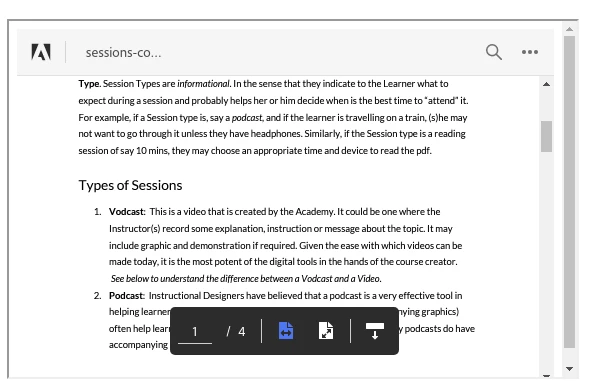
 

Is some other parameter to be given? Thanks

This topic has been closed for replies.

2 replies

Participant
August 23, 2022

We are having the same issue... when using embed mode the zoom controls are gone. This pretty much renders this view mode useless... the whole point of the pdf is to zoom in and out. How can we address this? Thanks

Adobe Employee
September 14, 2020

Hi Raju, 
Is this happening with all the PDFs or any particular PDF? Ideally, it should show zoom controls as well. If it is happening with a particular PDF, could you please help us by sharing the same if possible.

Thanks

Participant
May 19, 2022

Was this problem ever fixed?  I am using the same configuration parameters and I'm seeing the same loss of the zoom controls. 


If I set the adobe-dc-view div size to 843 x 706, I get the zoom controls.  However if I set the dimensions to 706 x 615 (15% smaller) the controls disappear.  When the PDF loads, getZoomLimits() shows {minZoom: 0.112, maxZoom: 6.454}


My options are:

embedMode1: "FULL_WINDOW",
defaultViewMode: "FIT_WIDTH",
showPageControls: true,
showLeftHandPanel: false,
showDownloadPDF: false,
pagemode: false,
showPrintloadPDF: false,
showAnnotationTools: false,
enableSearchAPI: false

Participant
May 19, 2022

  In addition, when the PDF opens the initial zoom level is 0.848.