
Participating Frequently
February 2, 2024
Question

Draft agreement added via the api is not showing on the AdobeSign UI

  • February 2, 2024
  • 1 reply
  • 661 views

I added an agreement via the API with the state "DRAFT". This was successful and I can find it with the request: "GET /agreements/{agreementId}"

However, when I search for it on the site it is not showing up.
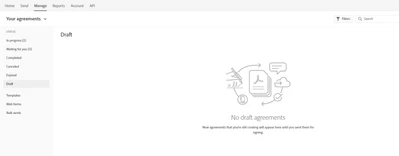


Pasting the agreementId into the url gives the error

"Invalid agreement ID"

When I follow the same steps but with the state "AUTHORING" it does show up on the website under the tab in draft.

This topic has been closed for replies.

1 reply

atsmusz_as_dsEng
Adobe Employee
Adobe Employee
February 2, 2024

This is probably a bit confusing but from the API ( V6 ) perspective, a DRAFT agreement is more like a recipe or maybe a container for an agreement and is a "data-only" stub record.  Not really yet an agreement as no real processing has been done.  In the U.I., what's called a draft is actuall in an "AUTHORING" state.


API DRAFT agreements can be seen in the GET /agreements response but will not yet show up in the UI.


You can create them in the API and then Post to get the COMPOSE view for a URL of the "send" page where you can complete/change and send or move forward to AUTHORING state.

Aaron Smusz - Data Science Engineering - Adobe Acrobat Sign