


Martha Bongiorno
Community Manager
Community Manager
December 1, 2025
Question

🌍 ACE Community Monthly Share – December

  • December 1, 2025
  • 13 replies
  • 2584 views

Hello ACE Community!! ❤️


December is here, which means one thing around our corner of the internet… 12 Days of Creativity is officially live!


This month is all about joy, low-lift creative wins, and giving ourselves (and our students!) moments of delight during the busiest stretch of the year.


This thread is your cozy corner to gather, share what you’ve been creating, and cheer each other on as we wrap up 2025 with a burst of creativity.


How to Join In

  • Share your December wins: Drop a link to any social post, video, or project you’ve tried this month.
  • Add a quick reflection: What brought you joy? What surprised you?
  • Use the Reply button so everything stays in one thread (easier for us all to scroll and celebrate together!).


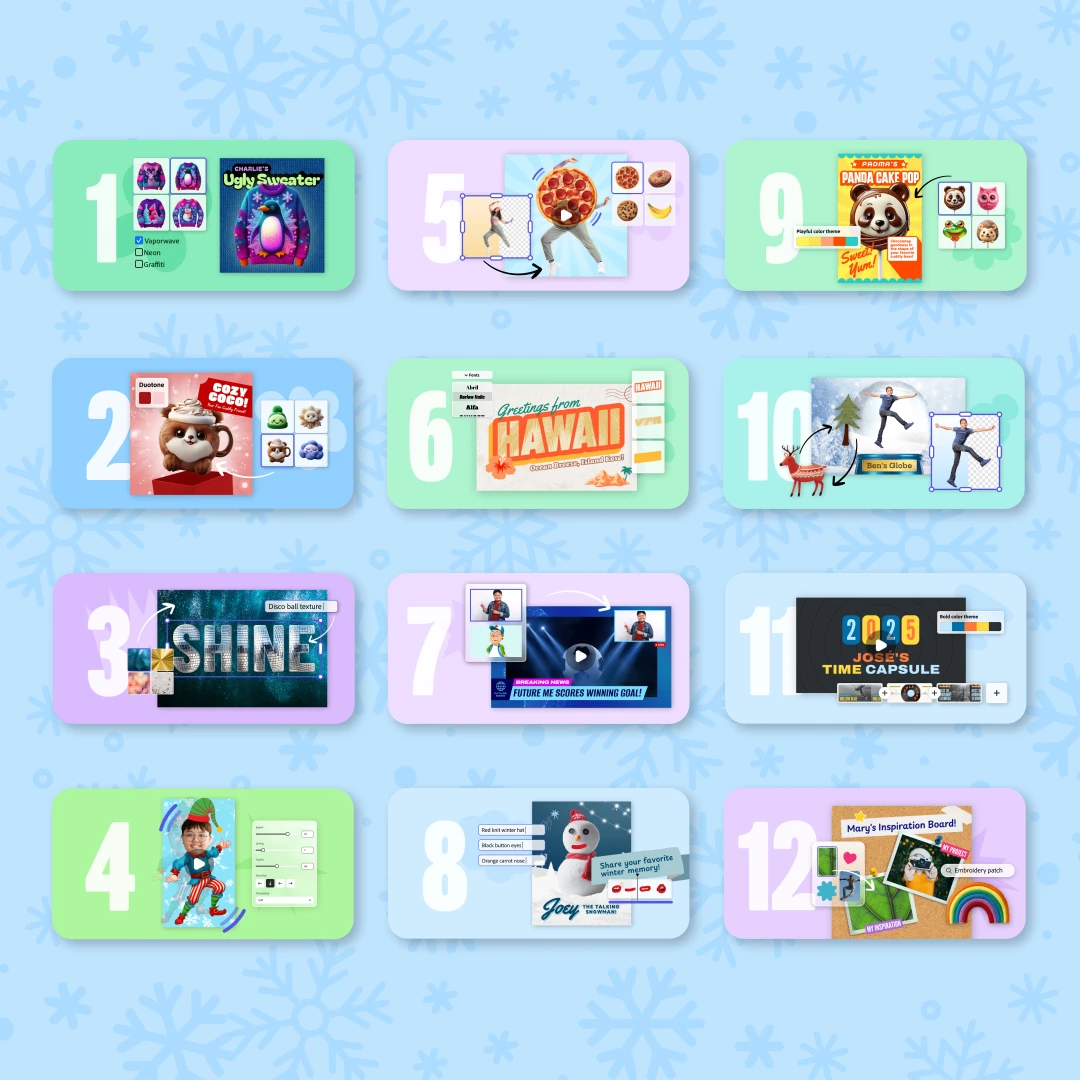
Not sure what to share? Try out one of the 12 Days of Creativity activities!

Pick a challenge and try it out today → https://adobe.ly/12DOC25


Each activity is designed to take 10–15 minutes, work with any grade level, and help students create something fun right away. Perfect for December library visits, class transitions, morning meetings, or quick creativity breaks.
12DOC_Campaign_1080x1080_Blue.png


Idea Sparks

Here are a few ways educators are already bringing the 12 Days to life:

  • Storytelling Moments: Have students narrate their Design a Stuffie or Vintage Postcard creations as character backstories.
  • Mini Presentations: Use Future You News Report or Talking Snowman as quick speaking + creativity warm-ups.
  • Community Displays: Invite students to add their Ugly Sweater or One-Word Wallpaper to a hallway “Creativity Wall” that grows each day.
  • Staff Lounge Smiles: Try Dancing Elf as a staff team-building moment. (You’re welcome in advance.)


Can’t wait to scroll through your posts and see the magic you’re creating with your students!!


With creative joy,
Your Adobe for Education Community Team

13 replies

January 14, 2026

Differentiated with S1 learners some did the make a Video lesson plan and those who found that too challenging were given the option to to the one the 12 Days - Learners who completed their adverts - chose one the 12 Day activities as an extension


S2 made advert for the Christmas Fayre: (1) Instagram 


Participating Frequently
December 24, 2025

I could not resist creating My Inspiration Board. It is a great activity for goal setting!

Tim's Inspiration Board


Participating Frequently
December 20, 2025

From hands-on experience, language-based word games build trust and long-term interest when they are updated regularly and designed with the user in mind. Platforms that offer clear rules, fair gameplay, and Spanish-friendly puzzles show real expertise and commitment to their audience. For anyone interested in practicing Spanish through daily word challenges and exploring reliable Wordle-style experiences, this resource is worth checking: https://wordleespañol.es/

Participant
December 15, 2025

12 Days of Creativity - Day 11: Personalize a Time Capsule


I’m so excited to share the Day 11 activity of the 12 Days of Creativity! Students and I had SO MUCH FUN personalizing our time capsules,  and I know you will, too.


Activity Overview:


In this Adobe Express guided activity, you customize a time capsule template with your favorite movie, song, and book of the year. One of the many things I love about the activities for the 12 Days of Creativity is that each one uses just a small handful of Adobe Express skills, so creating doesn’t get overwhelming. When personalizing your time capsule, you’ll practice replacing text and videos, changing the theme color, and adding audio.


Step-by-Step:


  1. Use the Quick Replace button to open a panel on the left where you can easily replace the text and video in each scene. Quick Replace makes it so easy to preserve any formatting and animations, as well as puts everything into the correct layer.

JessicaRAdams_0-1765814971946.png


2. Choose a theme color by clicking the palette icon. There are many, many themes to choose from. Don’t forget to shuffle the colors if you want to try them in different arrangements.

JessicaRAdams_1-1765814971948.png


3. Delete the template music by right clicking on the audio in the timeline. Then click the Add audio button to search for an insert one of the variety of music options.

JessicaRAdams_2-1765814971950.png


4. Finally, download or share your creation!


For more details and to learn about my time capsule, check out my Instagram post.


Classroom Ideas:

There are so many ways you can use this template!


  • Create a time capsule for a book character or historical figure
  • Set goals for the new school year or new calendar year
  • Reflect on your learning over the past unit
  • Student and teacher introductions


I had students work in groups to come up with ways to use this template, and almost every group mentioned student introductions at the beginning of the school year. They love learning about each other! And I must say, I loved learning about them during this project! You can check out their work here.


💗 It’s Your Turn!


Try the Day 11 activity here: https://adobe.ly/12DOCday11

Try all 12 Days here: https://adobe.ly/12DOC25


I can't wait to see what you create!

#AdobeEduCreative

Participating Frequently
December 21, 2025

Personalize a Time Capsule

I have really enjoyed diving into the 12 Days of Creativity, especially Personalize a Time Capsule.


Ann Kozma
Community Manager
Community Manager
December 14, 2025

I've loved creating during the 12 Days of Creatiivty this year! SO many possibilities for how these activites can be extended into curricular areas but 2 things I love about this annual tradition - teaching creative skilling through these activities and learning how to use the tools with confidence! Not only do these 12 activities help students see themselves as designers and creators, but learning how to transform the visuals with intentional learning!

-Background swapping
-Generating images & effects
-Transforming text effects
-Adding animations 
-Layering elements
-Multi-layer video editing

If you haven't tried the activities in the 12 Days of Creativity - you're right on time to start. You can jump in any time! More info can be found here: adobe.ly/12DOC

Wrap up 2025 with these awesome creative activities and have fun too! My favorite this year was the Design an Ugly Sweater (and the Personalize a Snowglobe!) -- if this sweater were to come to life, I'd definitely rock my shrimp and cactus festive fit with a smile! Keep us posted on what you create! 

...AND MORE!


Ann's Ugly Sweater-2.png

Participant
December 12, 2025

12 Days of Creativity – Day 10: Construct a personalized snowglobe

Day10Snowglobe.jpg

Create your own personalized snow globe, then add animation to bring the scene inside to life.

  1. First, you will need a head-to-toe photo of yourself. You can ask a partner to take a couple of photos of you using your iPad or computer.


bradnance_1-1765503094147.jpeg

2. Use Quick replace to swap the photo inside the globe with one of yourself or a representative image. Remove the background and resize it to fit neatly.


bradnance_3-1765503204293.jpeg

3. Replace decorative elements like trees or houses with new ones from Design assets or Photos. Resize and arrange them to match your theme.


bradnance_4-1765508776325.jpeg

4. Edit the name on the globe with your own and adjust the font and colors to fit your style.


bradnance_5-1765508834527.jpeg

5. Share your snow globe to a gallery!


Give it a try yourself or with your students today!

https://adobe.ly/12DOCday10 


Check out my Social Post for examples:

https://tinyurl.com/4epc3y3w 

Student Examples:

https://tinyurl.com/3fbcm5cv 

Classroom remix ideas

-Take a couple of photos in different poses before you begin. (For students that don't want to be photographed. You can use Media and Photos and use a stock photo.) -If you have advanced students you could record a short video to put in the snow globe. Science: Add animals that would be in a cold weather habitat. ELA: Add characters from a story. Art: Student's could draw their own cabin or animal.

Post your short video to your preferred social platform(s) (Instagram, TikTok, or X).

Include the hashtags: #AdobeEduCreative #12DaysofCreativity #ad 


@bradnance
Ann Kozma
Community Manager
Community Manager
December 14, 2025

Brad -- you crushed this! What a dynamic share and what awesome ideas to extent into Science, ELA and Art! Thanks for this awesome share!!

Participating Frequently
December 21, 2025

Construct a Personalized Snowglobe

I enjoyed creating a personalized snowglobe by exploring the art of animation, generative AI and design assets. 

Participant
December 5, 2025


DAY 5 is here! : Animate a Funky Snack!

SEE POSTS ON MY SOCIALS!

https://x.com/GreenScreenGal 

https://www.instagram.com/GreenScreenGal44 


Time to make your favorite snack come alive in

—whether it’s groovin’, swayin’, or two snacks teaming up for ultimate delicious chaos. Bring the flavor, bring the flair… and bring a real snack, because this one will make you hungry.   Your snack’s big moment: animate it, funk it up, and snack responsibly.


Try all 12 Days activities here:

... https://adobe.ly/12DOC25 Let’s unwrap a little joy together.

#adobeeducreative #12daysofcreativity


Creativity UnWrapped Slide Deck-14.png

PLEASE ENJOY Curriculum Extensions using your own FUNKY SNACK! https://bit.ly/DAY5ADOBE

Screen Shot 2025-12-05 at 6.48.25 PM.png

Also, CHECK OUT MY VIDEO with the STEP by STEP!

DAY 5: How to Animate a FUNKY SNACK!

Screen Shot 2025-12-05 at 6.43.21 PM.png

HAVE SO MUCH FUN and share your OWN SNACK! 

USE:  #adobeeducreative #12daysofcreativity


NicoleO'Connor
Adobe Employee
Adobe Employee
December 16, 2025

You looked like you had the most fun with this activity!! You absolutely nailed the energy needed for a wacky activity like this!! 

thenextgenlib
Known Participant
December 4, 2025

Dancing Elf Transformation Activity in Adobe Express

12 Days of Creativity – Classroom Spotlight

Hi everyone! I’m excited to share my Day 4 activity for the 12 Days of Creativity campaign:
Transform Yourself Into a Dancing Elf (or ANY holiday character!) 🎄💃✨

This activity uses Adobe Express to blend creativity, motion graphics, storytelling, and inclusive holiday representation—all in a quick, highly engaging way that works for any grade level.

📝 Activity Overview

In this project, students use Adobe Express to:

  1. Start with a photo of themselves or a character image.

  2. Use the “Animate from Audio” and “Cutout” features to turn it into a dancing elf, Santa, dreidel, snowperson, gingerbread kid, or any winter-holiday character.

  3. Add backgrounds, props, text, and music to personalize the final video.

  4. Export a short dancing-character clip to use for writing prompts, SEL reflections, media literacy discussions, or seasonal showcases.

This works beautifully during December because it’s fun, fast, and adaptable for representing multiple winter holidays, not just Christmas.

📸 Step-by-Step (Adobe Express Workflow)

  1. Start a New Project → Upload Photo

  2. Use “Remove Background” to Cut Out the Character

  3. Choose “Animate from Audio” → Pick the WOBBLE Style

  4. Add Holiday-Themed Backgrounds or Upload Your Own

  5. Customize with Stickers, Shapes, and Text

  6. Export as MP4 or GIF → Share or Remix

📚 Classroom Applications & Remix Ideas

ELA / Storytelling

  • Write an origin story for the holiday character

  • Create a comic panel or dialogue scene

  • Generate captions or short scripts for social posts

Art / Media Literacy

  • Explore character design choices (color, movement, symbolism)

  • Discuss AI-generated elements and digital ethics

Social Studies

  • Represent global winter holidays (Hanukkah, Diwali, Las Posadas, Kwanzaa, etc.)

  • Design characters tied to cultural traditions

STEM

  • Create a “Scientist Elf” explaining a lab rule or safety tip

SEL & Community Building

  • “Design a character that represents your joy this season”

  • Gallery walk with positive peer feedback

More lesson ideas: bit.ly/dancingelf25 

🔗 Social Post

Here’s the social video I posted as part of Day 4:
https://www.instagram.com/reel/DR175X6jQRB/?utm_source=ig_web_copy_link&igsh=MzRlODBiNWFlZA== 

🎬 Student Work Gallery

Public class gallery link (faces/names removed):
https://new.express.adobe.com/galleries/published/urn:aaid:sc:VA6C2:204bd000-bbcb-4a86-8669-c2c6d941d672 

If anyone remixes this activity, I’d love to see your students’ creations. Reply with your examples or share on socials!

Amanda Hunt @thenextgenlibrarian
Participating Frequently
December 20, 2025
Catherine_Stewart2504
Participant
December 3, 2025

Day 3 is bringing the VISION! 👀✨🔮

Ready to manifest your goals for 2026? Want to reflect on 2025? Let’s create the ultimate One Word Wallpaper! 🌟


My Adobe Ambassadors and I are here for Day 3 of the 12 Days of Creativity, and we are absolutely loving today's challenge! 👏

Let’s face it—we all need a bit of a mental reset sometimes (students included!). So, we are skipping the standard resolutions and reflections, and creating One Word Wallpapers instead! 🖥️️ It is the perfect mix of mindfulness and digital design, and honestly? It’s such a brilliant, relaxing activity for when you simply need a creative break in the classroom. 🧘‍♀️🎨


Here is the game plan to create yours in @adobeexpress:

  • Pick Your Power Word: Choose ONE word that defines your goal for the year. Type it out in ALL CAPS—we want this to be bold! 💥

  • Make it Look Like it Feels: Use Text Effects to match the texture to the meaning. Is your word "MAGICAL"? Make it look like glittering lights! Is it "JOY"? Make it look like balloons! 🎈🌟

  • Find Your Background: Hop into Elements or Photos to find an image that sets the scene without stealing the show.

  • Make it Pop: Add some drama with the Effects panel! Throw on a drop shadow or a neon glow to match your word’s energy. ✨

  • Save it as your wallpaper so you see that motivation every time you log on! 💪


Stuck on which word to pick? Here are some fun combos to try in the Text Effects generator! 🎨✨

  • 💪 STRONG → Describe it as: "Polished steel metal" or "Solid rock stone"

  • 🌿 GROW → Describe it as: "Green vines and blooming flowers"

  • SHINE → Describe it as: "Bright neon lights" or "Gold glitter"

  • 🔥 FIERCE → Describe it as: "Burning fire and lava"

  • ☁️ PEACE → Describe it as: "Soft fluffy white clouds"

  • ENERGY → Describe it as: "Electric blue lightning bolts"

  • 🚀 DREAM → Describe it as: "Purple and blue galaxy stars"

  • 🎨 CREATE → Describe it as: "Colorful paint splatter" or "Playdough"


Need help to get started? Watch our video and 'how to guide':

🔗 https://bit.ly/49Tb5xt 

🔗 https://bit.ly/4ovs24Q 


I can’t wait to see what words you and your students choose at: https://adobe.ly/12DOCday3 .Tag me so I can see your creations! 💻

#AdobeEduCreative #12DaysofCreativity #ad @adobeexpress

Participating Frequently
December 16, 2025

I enjoyed creating my one-word goal in this activity. VISION reminds of my outlook on a bright beginning to a New Year. One of my students chose the word "DRAW" for inspiration. 

My mind right now.png

12 Days of Creativity.png


NicoleO'Connor
Adobe Employee
Adobe Employee
December 16, 2025

That 'vision' one is SO cool!! Text effects are absolutely class!

Participating Frequently
December 3, 2025

My grade 6 students are really enjoying the challenges of designing various elements of the 12 Days of Creativity. Here are a few of their creations. 

Julia Dimitriou Design an ugly sweater 10.58.49.pngKalina Ysabelle Legayada Design an ugly sweater 2.31.08 PM.pngJayden Asgarali Design your own stuffie 07.02.23.pngYoustina Alabboud Create a one-word wallpaper 12.22.11.pngMy background Title.png

Ann Kozma
Community Manager
Community Manager
December 5, 2025

These are SO SO SO GOOD!!! Please tell your students they ROCKED this challenge and are making the #12DaysOfCreativity SO MUCH FUN!