


Participant
November 28, 2023
Question

acrobat pro OCR 할때 2개국어는 따로 따로 2번 작업해야 하는가요?

  • November 28, 2023
  • 1 reply
  • 519 views

안녕하세요.

크리에이티브 클라우드를 구독했습니다. 


외국어 공부책을 ocr 입히려고 하는데... 제가 못찾는건지 몰라도...한개의 언어밖에 설정이 안됩니다. 


보통 외국어교재는 일본어, 한국어.. 이렇거나,,,, 중국어 한국어 이런식으로 한 책에 2가지 언어가 있는데..


설정창에는 한가지 언어만 체크가 되고..중복체크는 안되는데...제가 뭘 몰라서 이런걸까요?
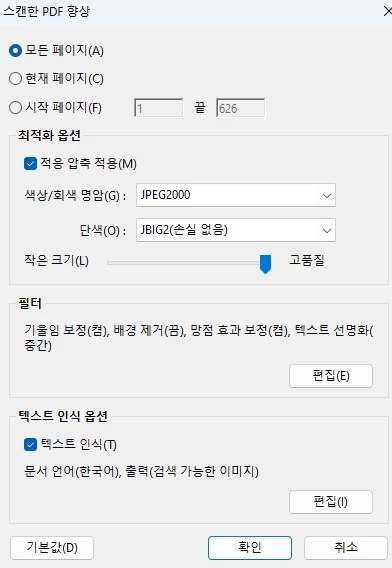
문서언어에서 한국어는 기본이고...일본어나 중국어(간체) 이렇게 2가지는 설정이 되야하는거같은데....


방금 일본어교재를 몇부분만 해봤는데...OCR을 일어로 설정하고 결과물을 한국어를 사전에 넣어봤더니..이상한 말이 나오고....


그래서 

일본어 ocr 입힌걸....다시 한국어로 또 입히면 될 줄 알았는데..그것도 안되는거같아요.


이거 어떻게 해결해야 될까요??


방법좀 알려주세요.. 구독한지 일주일이 다 되가서....2개국어 동시에 ocr 못입힌다면...취소하려구합니다. 


This topic has been closed for replies.

1 reply

Meenakshi_Negi
Legend
December 21, 2023

Hi 용갑33855636r7mt,


Thank you for reaching out, and sorry about the delay in response.


Currently, you can OCR in one language at a time. For more information about OCR, refer to the following help document: https://helpx.adobe.com/acrobat/using/edit-scanned-pdfs.html.

You may share your suggestion with the product team via the following page: https://acrobat.uservoice.com/forums/590923-acrobat-for-windows-and-mac


Let us know if you have any questions.


Thanks,

Meenakshi