


Participant
October 17, 2018
Question

Acrobat Reader DC no permite abrir archivos desde Adobe Document Cloud

  • October 17, 2018
  • 1 reply
  • 1210 views

Mediante aplicativo intento acceder a mis archivos de Adobe Document Cloud, pero al intentarlo arroja la siguiente notificacion:
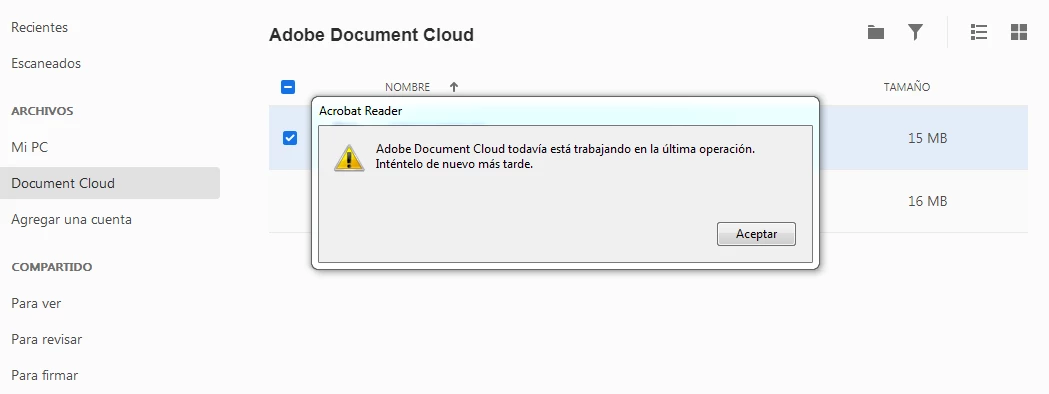
Version de Acrobat Reader DC: 2019.008.20071

Windows 7 64x

Pruebas:

-Reinstalar aplicativo

-Reloggueo mediante cuenta

This topic has been closed for replies.

1 reply

AkanchhaS8194121
Legend
October 17, 2018

Hi Patolin,

Could you please help us with the exact notification message displays in the above screenshot? Since the message in the image format so we are unable to translate it.

I assume that that application might not be syncing with the Document Cloud storage online and that's returning the error in return.

You may try the following steps to see if that makes a difference-

1- Adobe Acrobat official update (19.008.20074) is now available. This update will be automatically pushed to all existing installations of Acrobat. If you want, you may also manually trigger the update early by opening the application and going to Help > Check for Updates

2-  Login to the Document Cloud web Adobe Document Cloud  and see if you can access the Document Cloud files from there?

3- If you are using any internet security software, then please turn it off for a while and then try accessing the Document Cloud files in Adobe Reader desktop app.

Antivirus software can help protect your computer against viruses and other security threats. In most cases, you shouldn't disable your antivirus software. If you have to temporarily disable it to install or activate other software, you should re-enable it as soon as you're done.

Hope this helps.

Regards,

Akanchha

PatolinAuthor
Participant
October 18, 2018

Akanchha,

Acabo de actualizar a version 19.008.20074 pero el problema persiste, los documentos de Document Cloud se sincronizan con la aplicacion, el problema es cuando intento abrirlos, adjunto nuevamente screenshot:

-Antivirus se encuentra deshabilitado

-Se ejecuta aplicacion en modo administrador

-Adobe Reader permitido en firewall de windows

Mediante portal accedo sin problemas a los documentos, descargandolos y ejecutandolos.

AkanchhaS8194121
Legend
February 15, 2019

Hey,

Apologize for not being able to reply to your last message. As asked earlier, are you able to access the files online via Adobe Document Cloud ? If yes, do you see all the files uploaded there and opening fine in the web browser?

I have requested for the exact translation of error message displays in the screenshot above.

Try Sign Out and Sign In in the Reader. 

Also, install the latest patch of Acrobat/Reader released in Feb- DC Release Notes — Release Notes for Acrobat DC Products

-Akanchha