


Adobe Acrobat online and Microsoft Defender for Cloud session policies
I’m trying to enable Microsoft Defender for Cloud session policies for the acrobat.adobe.com web app. (as per here https://learn.microsoft.com/en-us/defender-cloud-apps/session-policy-aad). Session policies will provide functionality to control document upload and download from the acrobat.adobe.com web app. With Microsoft Defender for Cloud session policies, the web app must be onboarded to Defender for Cloud for conditional access control. This would then automatically redirect the application through the MCAS proxy, when SAML authentication is completed. For example:
- Go to acrobat.adobe.com and sign-in
- SAML sign-in will redirect to the Microsoft sign-in page where the user can sign in with Azure credentials.
- After successful authentication, the application is redirected to https://auth.services.adobe.com.mcas.ms/ and then to acrobat.adobe.com.mcas.ms.
- Microsoft Defender for Cloud session policies would then be applied through the mcas.ms proxy.
But this does not work. SAML Authentication is working but with the redirect to https://auth.services.adobe.com.mcas.ms, Adobe generates an error: “Could not log you in. This might be a sign of an IDP initiated login, which we don't support.”
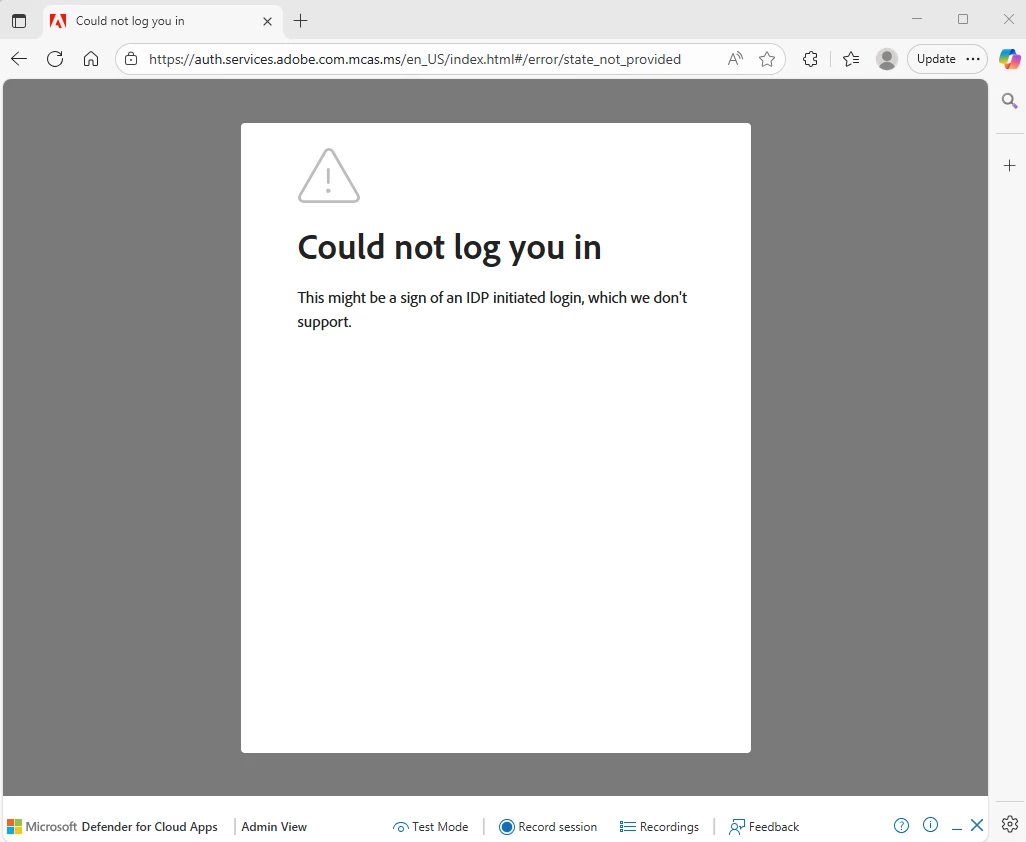
Microsoft Defender for Cloud has functionality to specify the specific login URL to redirect to after successful SAML authentication, but it is not clear if acrobat.adobe.com has such a deeplink URL to facilitate IDP initiated login. There is a similar Adobe Acrobat Sign article explaining how this can be done for Adobe Acrobat Sign (see https://helpx.adobe.com/sign/using/adobesign-enable-sso-when-auth-by-idp.html?linkId=100000380207640) but could not find anything similar for acrobat.adobe.com.
Would appreciate further information on how this can be achieved.
 AdChoices