


Participant
March 18, 2018
Answered

adobe change my download file names to open with adobe and it doesnt work so i want to change it back to pick a program

  • March 18, 2018
  • 1 reply
  • 692 views

I was trying to change my embroidery files (pes) to a pdf so I could print them. The adobe program did not work so I cancelled it. But now when I download my pes files it list them to open with adobe (that they are an adobe document) no there not they are a pes file.  I have gone to change the open with file --and I see where adobe is listed but it does not give me the option to pick a program to open. It really wants me to pick a program to open which I don't have yet.

This topic has been closed for replies.
Correct answer AkanchhaS8194121

Hi Marym,

We apologize for the delay in response to your query.

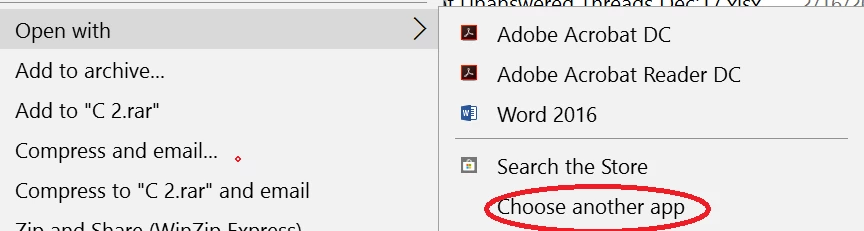
You must Right Click on the document>Open With > Choose another app>More Apps

After selecting more apps select the app you are looking for and then Check the box "Always use this app to open a .pes file"

As you have mentioned that, when selecting the "Open with" option its not giving the option to select other app, so could you please confirm the operating system you are working on or share the screenshot when you select "Open With"?

Regards,

Akanchha

1 reply

AkanchhaS8194121
AkanchhaS8194121Correct answer
Legend
April 4, 2018

Hi Marym,

We apologize for the delay in response to your query.

You must Right Click on the document>Open With > Choose another app>More Apps

After selecting more apps select the app you are looking for and then Check the box "Always use this app to open a .pes file"

As you have mentioned that, when selecting the "Open with" option its not giving the option to select other app, so could you please confirm the operating system you are working on or share the screenshot when you select "Open With"?

Regards,

Akanchha