
danhn74461637
Participant
May 29, 2017
Answered

Adobe fill & Sign - how to permanently set apps not to remember signature signed in the past?

  • May 29, 2017
  • 1 reply
  • 1327 views

Hi

I have Adobe Fill & Sign installed on iPhone and iPad

wonder if there is a way disable remembering of pasted insert signature permanently

so every time we sign a document user are forced to sign it.

thanks

Dan
This topic has been closed for replies.
Correct answer Tariq Ahmad

Hi Dan,

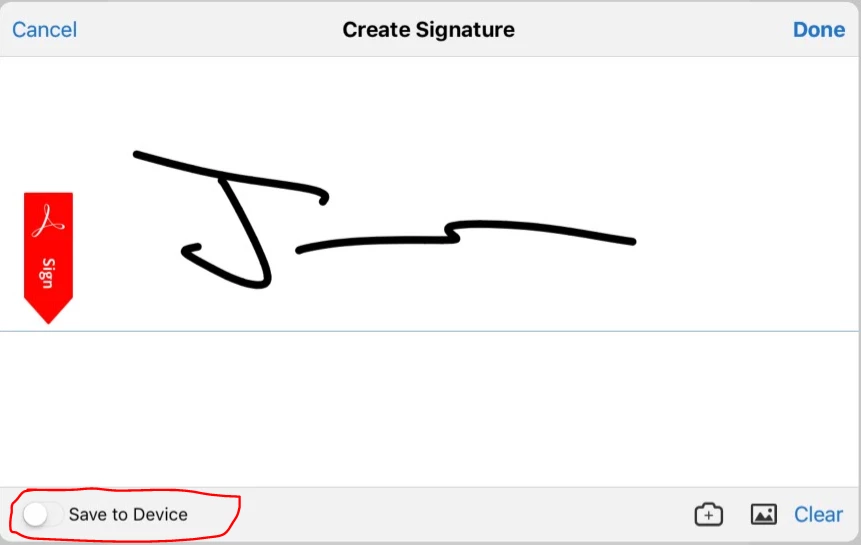
In the latest version of Fill & Sign for iOS, when a user clicks the pen icon to show the signature panel, toggling off the "Save to Device" switch (at the bottom left corner of this panel) allows a user to sign without storing his/her signature.  This setting will then remain the same for all subsequent signers.

Let us know if that helps.

-Tariq Dar

1 reply

Community Manager
May 30, 2017

Hi Dan,

Adobe Fill and Sign is a service. If you are logged in with Adobe Id your signature will sync across the devices using the same Adobe ID.

You can create a new signature any time you want and sync: Fill and sign PDF forms using Adobe Acrobat Fill & Sign

Let us know if you have further questions.

-Tariq Dar

danhn74461637
Participant
May 30, 2017

Hi Tariq

thanks for response

but what we are trying to achieve is we don't want the apps to store our/staff signature

Tariq AhmadCommunity ManagerCorrect answer
Community Manager
June 1, 2017

Hi Dan,

In the latest version of Fill & Sign for iOS, when a user clicks the pen icon to show the signature panel, toggling off the "Save to Device" switch (at the bottom left corner of this panel) allows a user to sign without storing his/her signature.  This setting will then remain the same for all subsequent signers.

Let us know if that helps.

-Tariq Dar