

Participant
September 17, 2018
Answered

Adobe Send - Failed in subject line

  • September 17, 2018
  • 2 replies
  • 1124 views

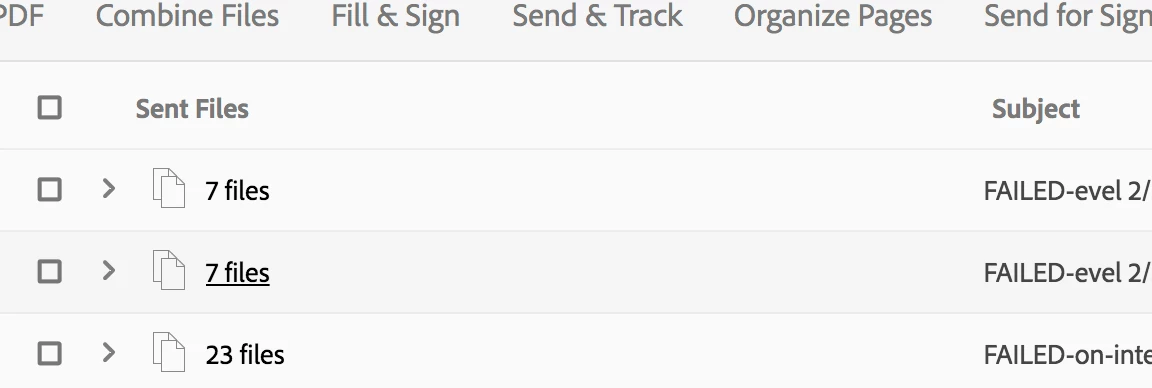
Sending files and the box pops up saying they have sent. Then when I go back in, and go to sent files, it says FAILED in front of the subject line. Help please!

This topic has been closed for replies.
Correct answer Altmedia

Hi All,

Would you please try the workaround shared by PHS19909 and let us know if that makes any changed for you.

Thank you so much PHS19909   for sharing your findings and updating the discussion.

Thanks,

Akanchha


I tried this - deleting over 400 files - and it seems to have resolved the issue. That said, I deleted over a thousand files before the issue even happened, so I wonder if it just took a while to clear. Thank you!

2 replies

Altmedia
Participant
September 26, 2018

Hello,

I am also experiencing this issue. Please contact us ASAP to resolve! Thank you.

PHS19909Author
Participant
September 27, 2018

I spoke with someone from Adobe and they suggested clearing out old files by going to your sent files, scrolling to the bottom and deleting as many as you can (we had to delete a ton!). Also by going to document cloud and cleaning out whatever you can. This seems to have currently solved our issue

AkanchhaS8194121
Legend
September 27, 2018

Hi All,

Would you please try the workaround shared by PHS19909 and let us know if that makes any changed for you.

Thank you so much PHS19909   for sharing your findings and updating the discussion.

Thanks,

Akanchha

AkanchhaS8194121
Legend
September 18, 2018

Hey PHS,

Sorry to hear about the trouble that you are experiencing.

Looking at the the screenshot above, it seems that you have been trying to send the files online through https://cloud.acrobat.com/send  ?

You may try the following troubleshooting to see if that makes a difference-

1- Check with a different web browser than what you are using currently.

2- If there is any internet security software please turn it off for a while and check back.

[Antivirus software can help protect your computer against viruses and other security threats. In most cases, you shouldn't disable your antivirus software. If you have to temporarily disable it to install or activate other software, you should re-enable it as soon as you're done.]

3- Try with Adobe Reader DC and see if you are able to send the files through that?

Adobe - Adobe Acrobat Reader DC Distribution

Regards,

Akanchha

PHS19909Author
Participant
September 19, 2018

Hi there,

We've tried different browsers and it does not work still.

There are no internet security softwares that are preventing it. We've tried on different computers as well.

Our concern is that we have paid for Adobe Send and are not able to use it since it's not working.

Does Adobe Reader DC cost money? Also, does that allow you to mass distribute files to many people?

Thank you!

AkanchhaS8194121
Legend
September 21, 2018

Hey PHS,

Sad to hear it didn't help. Adobe Reader DC is a free application that you can download from Adobe - Adobe Acrobat Reader DC Distribution  and yes it does helps you using your Send & Track service with all the features you have been getting online via web browser.

Please check with that and let us know the result.

-Akanchha