kristenr33506
Participant
June 29, 2017
Answered

Can't save PDF as JPEG

  • June 29, 2017
  • 4 replies
  • 61332 views

I do not understand, in the past I could always save a PDF to a JPEG, but now I cannot. I bought the PDF pack from Adobe for $70 and can now convert things. I want to share this with the rest of the office (there are 6 of us) and although we all have our own computers we are all on one server. I cannot find out how I can do this or if I can do this and there is no phone numbers to call and it cannot be helped over chat and I very frustrated.

This topic has been closed for replies.
Correct answer Adorobat

Hi kristenr33506,

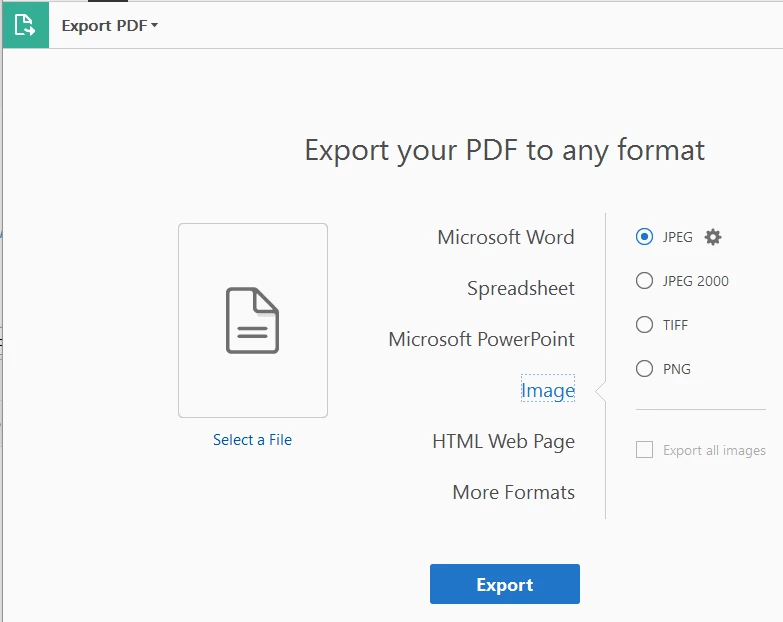
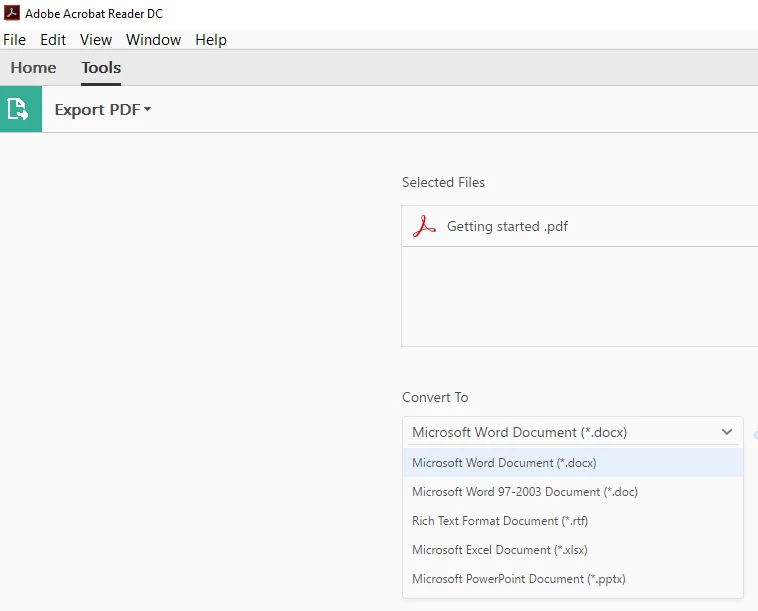
You might be trying to export pdf in Acrobat Reader desktop application which doesn't have jpeg as a conversion option.

Here is the screenshot of the Export PDF option available in Reader DC :

This is the screenshot of the Export PDF option in Acrobat DC:

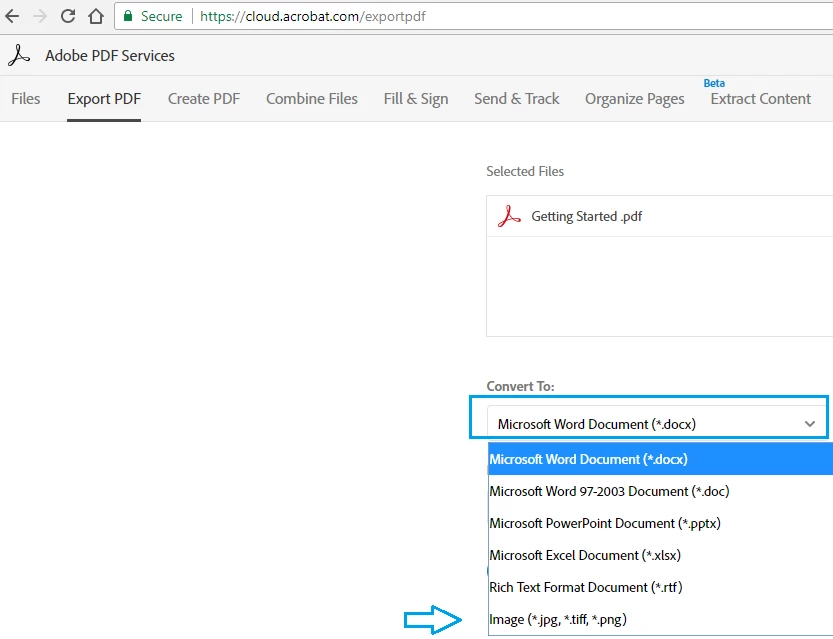
Try exporting PDF online using this link: https://cloud.acrobat.com/exportpdf  , click on down arrow next to (*docx) and check if Image (*.jpg, *.tiff .... is there).

Below is the screenshot:

Sorry for say but Adobe PDF Pack subscription can't be shared with other members.

-Shivam

4 replies

Participant
May 1, 2023

We are a school and this started on multiple machines on Friday 28 April 2023.  Many users.  Can save to desktop, not into work folders.

cynthiagpix
Participant
June 24, 2021

I had the same problem, which is why I'm here. Finally, I went back and tried, Save a copy! Yup! Then I was able to save it as a .jpg!

Legend
June 24, 2021

cynthiagpix, are you using Acrobat Reader like everyone else here? This sounds like an issue with the latest Photoshop instead.

Adorobat
Community Manager
AdorobatCommunity ManagerCorrect answer
Community Manager
July 7, 2017

Hi kristenr33506,

You might be trying to export pdf in Acrobat Reader desktop application which doesn't have jpeg as a conversion option.

Here is the screenshot of the Export PDF option available in Reader DC :

This is the screenshot of the Export PDF option in Acrobat DC:

Try exporting PDF online using this link: https://cloud.acrobat.com/exportpdf  , click on down arrow next to (*docx) and check if Image (*.jpg, *.tiff .... is there).

Below is the screenshot:

Sorry for say but Adobe PDF Pack subscription can't be shared with other members.

-Shivam

Participant
May 21, 2020

I cannot use the export to image function either to jpg or png. It looks like it does it, but the file is never there. I have tried saving it in a different folder, but that does not work either. I have Windows 8.1 and I am using Adobe Acrobat DC. All other functions work, except the export to image. I can do export to Word, for example. Please help!

try67
Community Expert
Community Expert
May 24, 2020
Adorobat
Community Manager
Community Manager
July 3, 2017

Hi kristenr33506,

We are sorry for the inconvenience caused to you.

As per the issue description mentioned above, you are unable to convert pdf as jpeg, is that correct?

Could you please try converting pdf to jpg using this link: https://cloud.acrobat.com/exportpdf  and see if that works?

What happens when you try to convert pdf file? Is there any error message you are getting?

Are you exporting in Reader using Tools>Export PDF option or online?

Have you tried converting pdf to other file formats like .doc, does that work?

Awaiting your response.

Shivam

kristenr33506
Participant
July 4, 2017

Hi Shivam,

I bought the PDF pack package for $70 a month with the intent that when someone sends me a PDF that I have to put on our social media page for the fire department I would be able to convert it to a JPEG. I have had success using the paid program to convert PDF's to Word and Excel docs. I have never seen an option to convert to JPEG, no error message, just no option.

Maybe I do not understand the product I paid for?

ALSO

Question #2 is that I bought this subscription and work in a fire department with 5 other staff members. We all have our own computers, but they are all on the same server. Can this program be shared to them somehow since we have one umbrella computer system?
Thanks so much for your help.