rjmturf1
Participant
February 10, 2015
Answered

Copy message from previously sent email

  • February 10, 2015
  • 3 replies
  • 696 views

-is there any way to save emails or better yet how come no resend button?

This is extremely inconvenient to cut and paste emails.  you cant even cut and paste email from a previously sent document.

This topic is closed to new replies. Start a new post to keep the conversation going.
Correct answer Amiable_contributors1587

If you want to re-use the subject and content of the message that you used when you sent the file, you can use the Forward feature.

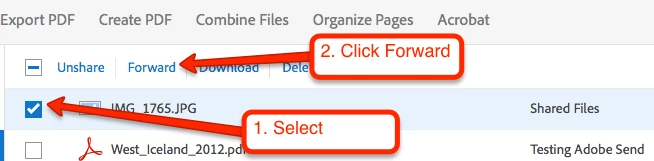
From the Sent Files list, simply select the file (or group of files) that you want to re-send, then click Forward.


On the next screen, the Subject and Message fields will be pre-filled with the original values.   Does this help?

3 replies

Inspiring
February 10, 2015

Hi rjmturf1,

Thanks for your feedback; feel free to submit your ideas via this form: https://www.adobe.com/cfusion/mmform/index.cfm?name=wishform&loc=en

In the meantime, you can copy the message that you included with a sent file:

  1. Log in to your account at https://cloud.acrobat.com/send.
  2. Click Sent Files, and then click the previously sent file.
  3. Click Open Link under Viewed By.
  4. Copy the email message.

Best,

Sara

Amiable_contributors1587
Participating Frequently
February 10, 2015

If you want to re-use the subject and content of the message that you used when you sent the file, you can use the Forward feature.

From the Sent Files list, simply select the file (or group of files) that you want to re-send, then click Forward.


On the next screen, the Subject and Message fields will be pre-filled with the original values.   Does this help?