Participant
January 4, 2017
Answered

delete documnet from the cloud

  • January 4, 2017
  • 1 reply
  • 465 views

Opened a document with adobe.com and now the document is on the cloud...I wish to delete this document from the cloud ...how do I do that??

    This topic has been closed for replies.
    Correct answer try67

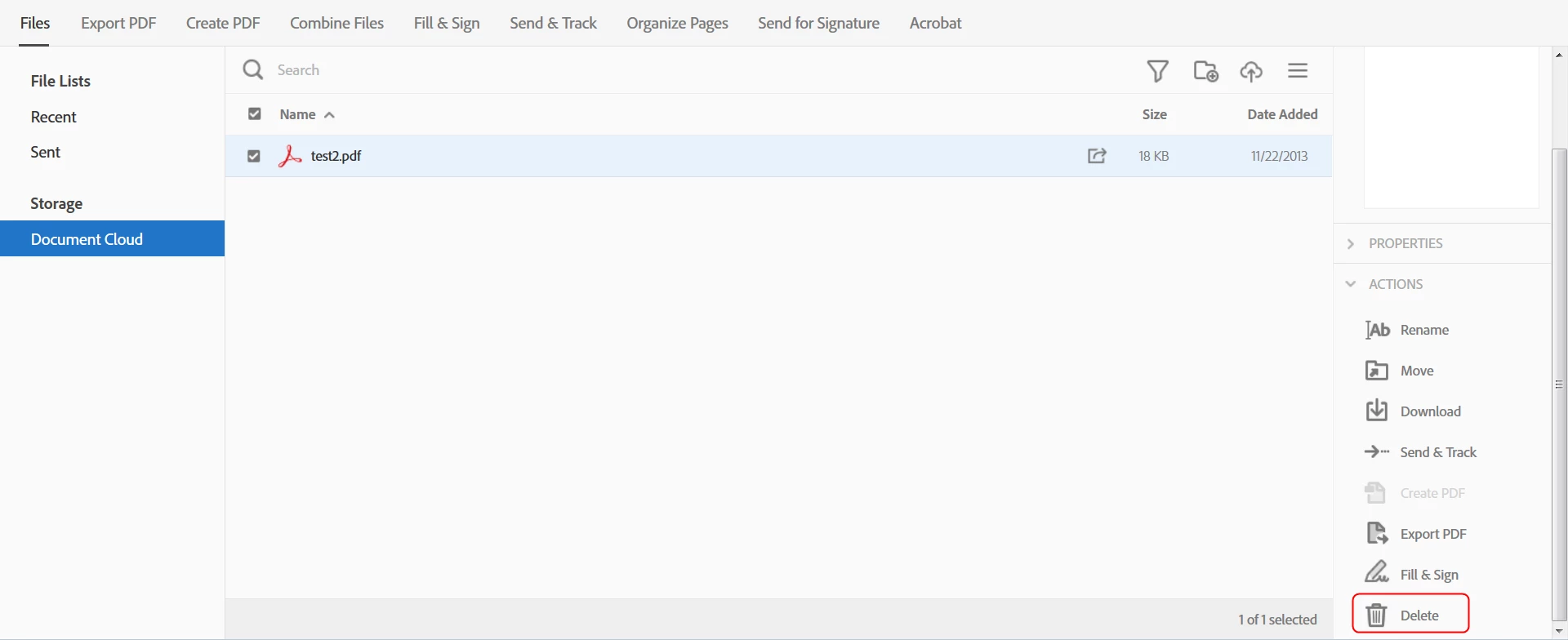
    Go to adobe.com, click on "Document Cloud Files", locate your file, tick the check-box next to it and then click on Delete in the Actions menu on the right (it's the last item in the list so you might have to scroll down to find it). It should look something like this:

    1 reply

    try67
    Community Expert
    try67Community ExpertCorrect answer
    Community Expert
    January 5, 2017

    Go to adobe.com, click on "Document Cloud Files", locate your file, tick the check-box next to it and then click on Delete in the Actions menu on the right (it's the last item in the list so you might have to scroll down to find it). It should look something like this: