
kirscox
Participant
July 17, 2017
Answered

Disable a "send & track document link" once its been created?

  • July 17, 2017
  • 1 reply
  • 1212 views

does anyone know how to disable or remove a shared file "send & track document link" once its been created? I have errors here that I would rather not been seen so I would rather the link not be active, then to be seen with inaccurate info. Anyone know how to disable the link once its been created? ?

Message was edited by: Mod Link removed.
    This topic has been closed for replies.
    Correct answer Adorobat

    Hi Kirscox,

    Sorry for the delay in response.

    As per the issue description mentioned above, you want to remove the link for shared file created under Send & Track, is that correct?

    Try steps mentioned below:

    1- Launch Reader>Home tab>click "Sent"

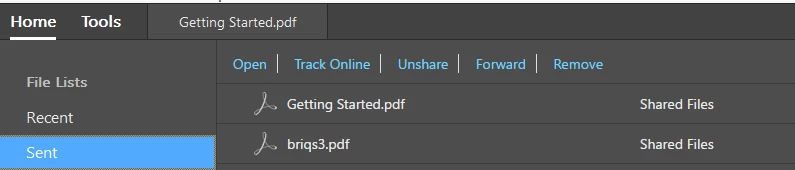
    2- Select the file and click Remove/Unshare at the top of the screen.

    Below is the screenshot:

    You can also remove files using a web browser @ this link: https://cloud.acrobat.com/sentfiles

    Let us know if you have any questions on this.

    Shivam

    1 reply

    Adorobat
    AdorobatCorrect answer
    Participating Frequently
    July 27, 2017

    Hi Kirscox,

    Sorry for the delay in response.

    As per the issue description mentioned above, you want to remove the link for shared file created under Send & Track, is that correct?

    Try steps mentioned below:

    1- Launch Reader>Home tab>click "Sent"

    2- Select the file and click Remove/Unshare at the top of the screen.

    Below is the screenshot:

    You can also remove files using a web browser @ this link: https://cloud.acrobat.com/sentfiles

    Let us know if you have any questions on this.

    Shivam