
Answered
Ecoding Error with Latex PDF
I converted a PDF created with pdflatex with the ExportPDF online tool. All PDF readers have no problem viewing the PDF file but the resulting *.docx file contains weird characters.
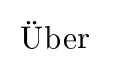
As an minimal example: This is a latex file
\documentclass{article}
\usepackage[utf8]{inputenc}
\usepackage[T1]{fontenc}
\begin{document}
Über
\end{document}
creating a simple pdf with only the german word "Über".
After converting with ExportPDF MS Word displays those characters.

What could cause this? Any idea how to fix this?


 AdChoices