Participant
May 23, 2018
Answered

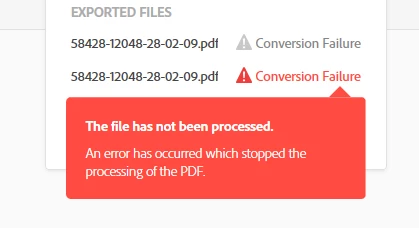
Export pdf to excel always reports conversion failure

  • May 23, 2018
  • 1 reply
  • 629 views

I am unable to convert a pdf file to excel using the Export PDF function.  The tool always reports the same error and no additional clue on what when wrong.

How can I use the export pdf to excel function successfully?

Thanks!

This topic has been closed for replies.
Correct answer AnandSri

Hello Carolinas,

Sorry for the delayed response and inconvenience caused. As per the description above, you are getting a File Conversion Failure error when exporting a PDF file to Excel, is that correct?

the record shows that you are subscribed to Adobe ExportPDF service with your current Adobe ID, try exporting the PDF file through the URL https://cloud.acrobat.com/exportpdf with your Adobe ID and password on a browser like Chrome, or Firefox, or Safari and see if this brings any difference.

You can also refer and try the suggestion from the following Adobe article File conversion error | Adobe Export PDF

have you tried converting any other PDF file and checked? If it is specific to one PDF file is it possible to share the PDF file with us so that we can test it at our end?

To share the file, please use Adobe Send feature, upload the file, share the link to files via private message only, How Do I Send Private Message

If you are using freeware Adobe Reader and getting the error message, please install the latest patch of Adobe Reader from help>check for updates, reboot the machine after installing the updates and try exporting the PDF file.

Let us know how it goes and share your findings.

Regards,

Anand Sri.

1 reply

AnandSri
AnandSriCorrect answer
Legend
May 27, 2018

Hello Carolinas,

Sorry for the delayed response and inconvenience caused. As per the description above, you are getting a File Conversion Failure error when exporting a PDF file to Excel, is that correct?

the record shows that you are subscribed to Adobe ExportPDF service with your current Adobe ID, try exporting the PDF file through the URL https://cloud.acrobat.com/exportpdf with your Adobe ID and password on a browser like Chrome, or Firefox, or Safari and see if this brings any difference.

You can also refer and try the suggestion from the following Adobe article File conversion error | Adobe Export PDF

have you tried converting any other PDF file and checked? If it is specific to one PDF file is it possible to share the PDF file with us so that we can test it at our end?

To share the file, please use Adobe Send feature, upload the file, share the link to files via private message only, How Do I Send Private Message

If you are using freeware Adobe Reader and getting the error message, please install the latest patch of Adobe Reader from help>check for updates, reboot the machine after installing the updates and try exporting the PDF file.

Let us know how it goes and share your findings.

Regards,

Anand Sri.