Participant
March 17, 2014
Answered

help with sending pdf files

  • March 17, 2014
  • 1 reply
  • 621 views

how do i send a pdf file i recieved one in my email and when i forwarded it it couldn't be read or is there any way i can print it off out ov my email thanks

    This topic has been closed for replies.
    Correct answer SumitV

    Hi rachy,

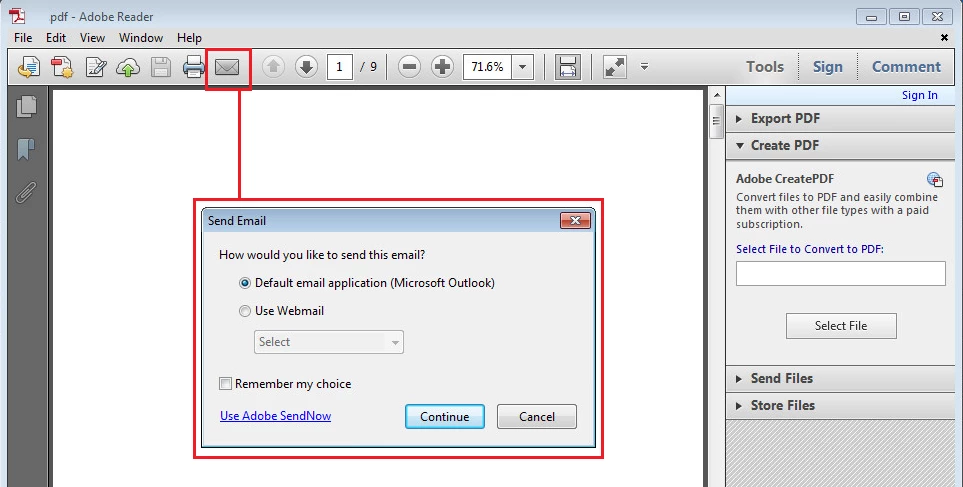
    You can either attach the PDF to e-mail and send or open PDF in Adobe Reader and then click on 'Envelope' icon on the tools bar and then Send E-mail box will open in which you can select the e-mail client using which you can send your e-mail. Please refer to the screenshot below:
    1 reply

    SumitV
    SumitVCorrect answer
    Participating Frequently
    March 17, 2014

    Hi rachy,

    You can either attach the PDF to e-mail and send or open PDF in Adobe Reader and then click on 'Envelope' icon on the tools bar and then Send E-mail box will open in which you can select the e-mail client using which you can send your e-mail. Please refer to the screenshot below:

    rachyAuthor
    Participant
    March 17, 2014

    thanks a lot

    Date: Mon, 17 Mar 2014 04:59:09 -0700

    From: forums_noreply@adobe.com

    To: rachael_dinsdale@hotmail.com

    Subject: help with sending pdf files

    Re: help with sending pdf files

    created by SumitV in Acrobat.com - View the full discussion

    Hi rachy,

    You can either atach the PDF to email and send or open PDF in Adobe Reader and then click on 'Envelope' icon on the tools bar and then Send Email box will open in which you can select the email client using which you can send your email. Please refer to the screenshot below:

    http://forums.adobe.com/servlet/JiveServlet/downloadImage/2-6216034-608512/450-227/Forum1.jpg

    Please note that the Adobe Forums do not accept email attachments. If you want to embed a screen image in your message please visit the thread in the forum to embed the image at http://forums.adobe.com/message/6216034#6216034

    Replies to this message go to everyone subscribed to this thread, not directly to the person who posted the message. To post a reply, either reply to this email or visit the message page:

    To unsubscribe from this thread, please visit the message page at . In the Actions box on the right, click the Stop Email Notifications link.

    Start a new discussion in Acrobat.com at Adobe Community

    For more information about maintaining your forum email notifications please go to http://forums.adobe.com/thread/416458?tstart=0.