
Answered
how do I convert from PDF to jpeg.
How do i convert from pdf to jpeg

How do i convert from pdf to jpeg
Try logging to to the web interface: https://cloud.acrobat.com. You should see the JPEG option there:
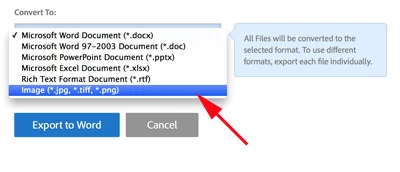
Tell me where the jpeg icon is located? I want to know. There is no jpeg icon, what you have is an export pdf. you go there, then you jump thru hoops to convert. .Then jump thru more hoops to save back to you own computer.I gave up and had to email from your program to myself[computer] to be able to download and store in the correct file.Then I was able to open and work in jpeg. What a waste of time. It is easier to draw in jpeg this is the only reason i am doing this, give me a break!
Already have an account? Login
Enter your E-mail address. We'll send you an e-mail with instructions to reset your password.


 AdChoices