How do i delete files from the cloud?
Trying to figure out how to delete a file from the pdf cloud?

Hi rodm51840960 ,
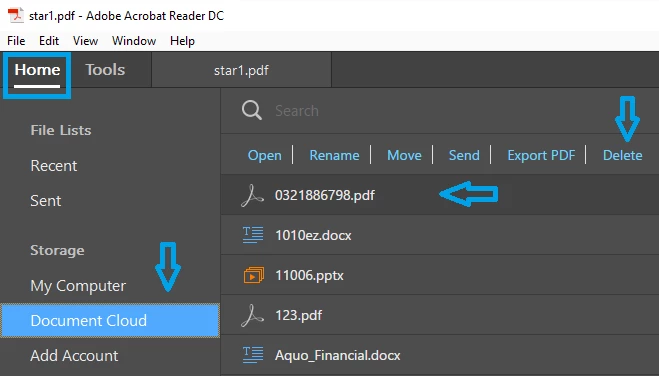
You can delete the file by opening the Document Cloud option in the Application or through a Web Browser.
For Application : Open Reader/Acrobat>Home>Document Cloud>select the file/s which you want to delete>Delete.
For Web : go to Cloud.acrobat.com >Files>Document Cloud>select the file/s which you want to delete>Delete(in the bottom right corner of the screen)
Let us know if you face any issue.
Thank You!
Shivam
Already have an account? Login
No account yet? Create an account
Enter your E-mail address. We'll send you an e-mail with instructions to reset your password.