

Participant
November 15, 2022
Question

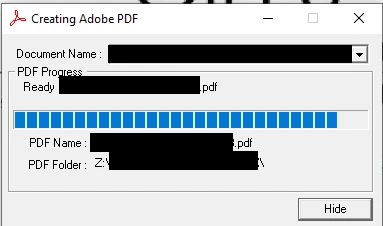
How do I disable this pop up?

  • November 15, 2022
  • 1 reply
  • 607 views

This pop up opens after each pdf I create. How do I make it stop?
 

This topic has been closed for replies.

1 reply

Meenakshi_Negi
Legend
November 21, 2022

Hi Bradley27143641essr,


Thank you for reaching out.


Would you mind sharing more information about this issue?

Please share the steps you do that result in the pop-up message.

Are you using the Acrobat Online service or the Acrobat Desktop application?

If you are using the desktop application, share the Acrobat and OS versions.


Let us know if the issue is already resolved.


Thanks,

Meenakshi

Participant
November 21, 2022
Hi MeenakshiNegi,

It happens every time I create a PDF file from Microsoft Access. File >
Print > Adobe PDF > OK. I have the Adobe Desktop Application:

Adobe ACrobat Standard 2020
2020 Release (Classic) | Version 2020.005.304.18

I am on Windows 10 Pro OS build 19044.2130

Thank you for helping me with this!
--
Best,


Bradley Wooten
