Participant
November 29, 2016
Answered

How do I put documents in the cloud?

  • November 29, 2016
  • 1 reply
  • 828 views

This program is much too complicated for me. I don't even understand the other questions. I have a new laptop. I want my documents from the old laptop to appear in the cloud so I can access them from my new one (before the old one dies.)  Such an easy question. I watched the video and she talked too fast and I didn't understand her and as I can see, didn't answer my question.
This topic has been closed for replies.
Correct answer Adorobat

Hi jennyc75868387,

Please follow below mention step to upload the files to Document Cloud:

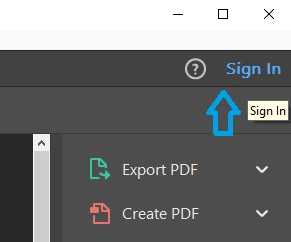
1- Launch Reader/Acrobat DC application on your old laptop>select Sign In the top right corner of the screen>enter your username & password.

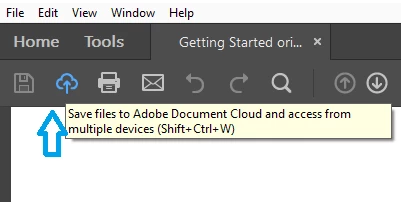
2- Open a pdf file which you want to upload to Document Cloud (Click File>Open)>click on the Cloud icon( in the top left corner of the screen)

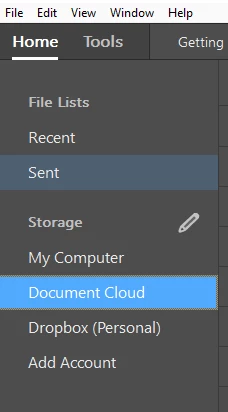
3- Once uploaded, you can see the file under Home>Document Cloud.

4- You can also upload files to Document Cloud using this link: https://cloud.acrobat.com/ 

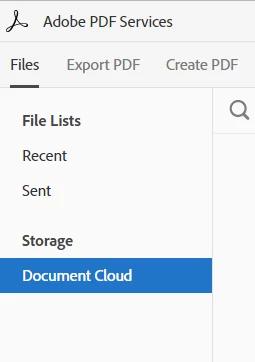
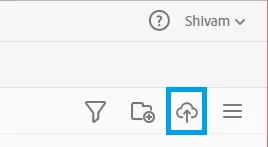
Visit this link in a Web Browser>enter your username and password>select Document Cloud( in the left hand corner)> then select Cloud icon ( in the right hand corner)> select the pdf file to upload.


Let me know if you face any issue while following the steps.

Thank You,

Shivam

1 reply

Adorobat
AdorobatCorrect answer
Participating Frequently
December 1, 2016

Hi jennyc75868387,

Please follow below mention step to upload the files to Document Cloud:

1- Launch Reader/Acrobat DC application on your old laptop>select Sign In the top right corner of the screen>enter your username & password.

2- Open a pdf file which you want to upload to Document Cloud (Click File>Open)>click on the Cloud icon( in the top left corner of the screen)

3- Once uploaded, you can see the file under Home>Document Cloud.

4- You can also upload files to Document Cloud using this link: https://cloud.acrobat.com/ 

Visit this link in a Web Browser>enter your username and password>select Document Cloud( in the left hand corner)> then select Cloud icon ( in the right hand corner)> select the pdf file to upload.


Let me know if you face any issue while following the steps.

Thank You,

Shivam