
Participant
January 20, 2016
Answered

How do I save document after extracting pages? Can't do it by conventional Save As.

  • January 20, 2016
  • 1 reply
  • 806 views

After successfully extracting pages from a document, I tried to save the changed document, but was unable to do so by the conventional "Save As" method.  Just showed a blank screen instead of a folder list to save to.  Same thing happened when I combined files.  Any help?
    This topic has been closed for replies.
    Correct answer AadeshSingh

    Hi alansilverberg,

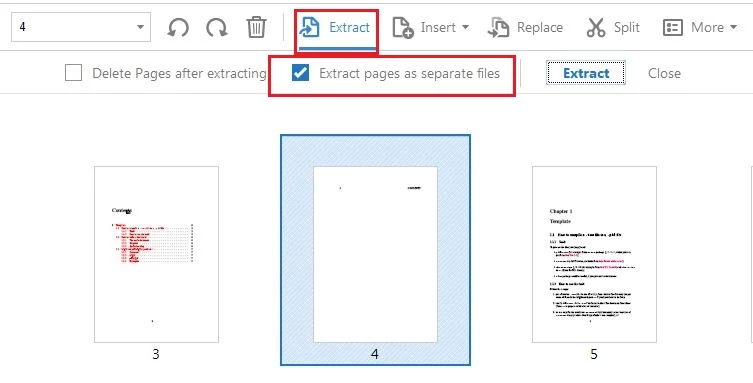
    Please choose the " Extract pages as separate files " option, once you extract the pages it will ask you to select the location where you want Acrobat to save the extracted pages. Give it a try.

    Also you "Save As" option should work. Please open Acrobat, navigate to Help menu & Repair the installing. Check if it fixes your conventional "Save As" method.

    Regards,
    Aadesg

    1 reply

    AadeshSingh
    AadeshSinghCorrect answer
    Participating Frequently
    January 25, 2016

    Hi alansilverberg,

    Please choose the " Extract pages as separate files " option, once you extract the pages it will ask you to select the location where you want Acrobat to save the extracted pages. Give it a try.

    Also you "Save As" option should work. Please open Acrobat, navigate to Help menu & Repair the installing. Check if it fixes your conventional "Save As" method.

    Regards,
    Aadesg